Cloudflare Agents ワークショップ
Cloudflare Developer Advocate
Yusuke Wada
https://workshop.yusuke.run/cloudflare-agents
Yusuke Wada
- 和田裕介
- Cloudflare Developer Advocate
- 2023年4月入社
- Honoの作者
::right::

やること
CloudflareでAIエージェントをつくろう!
アジェンダ
- AIエージェントとは?
- CloudflareでAIエージェントを作る理由
- AIエージェントに必要な3つの要素
- Agents SDKについて
- Workers AI / Schdule tasks / Browser Run / Workflowについて
- デモ
- 実用的なエージェントを作る
- その他事例
- AIを使った開発
方針
- デモ中心でいきます
- 中で何が動いてるか理解してもらいます
- コーディングエージェントでの開発を見据えます
AIエージェントとは?
AIエージェントは、AIを活用したコンピュータプログラムで、明示的な指示がなくても自律的にタスクを実行して人間のユーザーを支援することができます。
https://www.cloudflare.com/ja-jp/learning/ai/what-is-agentic-ai/
AIの変遷
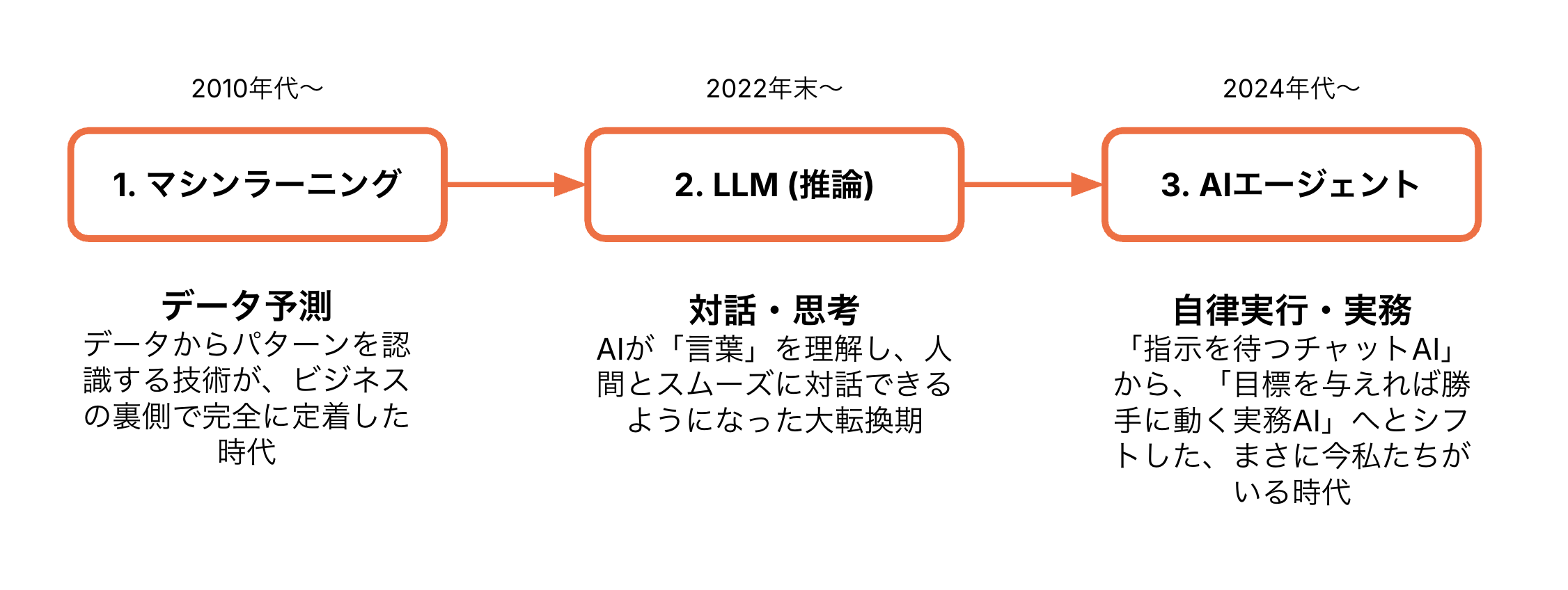
AIが考えるだけじゃなくて行動する
AIエージェントの活用シーン
- ビジネス業務
- 競合のリサーチ、データの分析からレポート(資料)の作成までを一貫して実行
- 旅行・スケジュール管理
- 「来月出張に行きたい」と伝えるだけで、航空券やホテルの検索・比較・予約までを自動で完了
- カスタマーサポート
- 顧客ごとの過去の購入履歴や問い合わせ状況をシステムで自律的に調べ、適切な対応を自動提案・実行
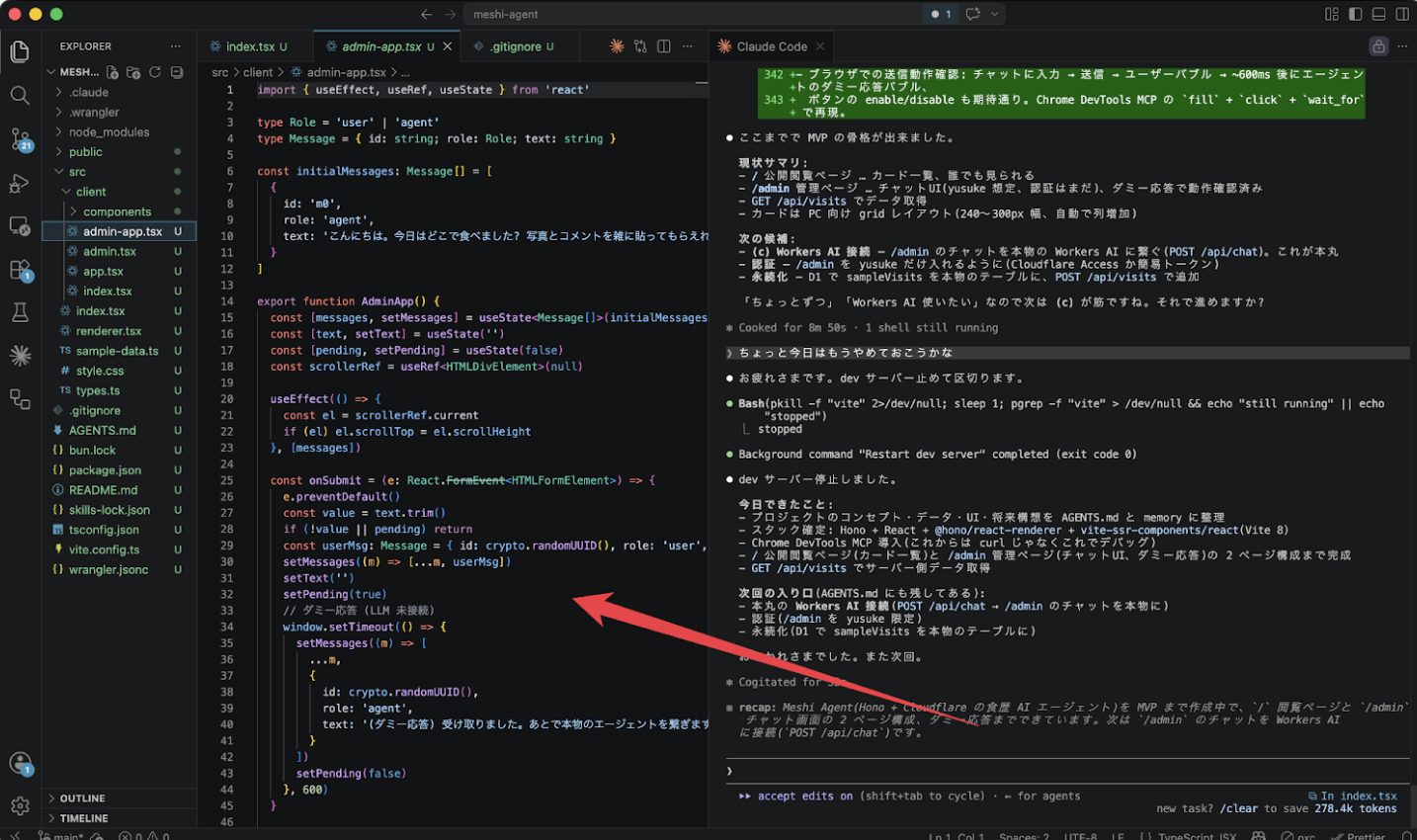
コーディングエージェント
- 自ら実行する
- 実行した結果を学習する
- 外部のツールと連動する
::right::
Cloudflare Agents
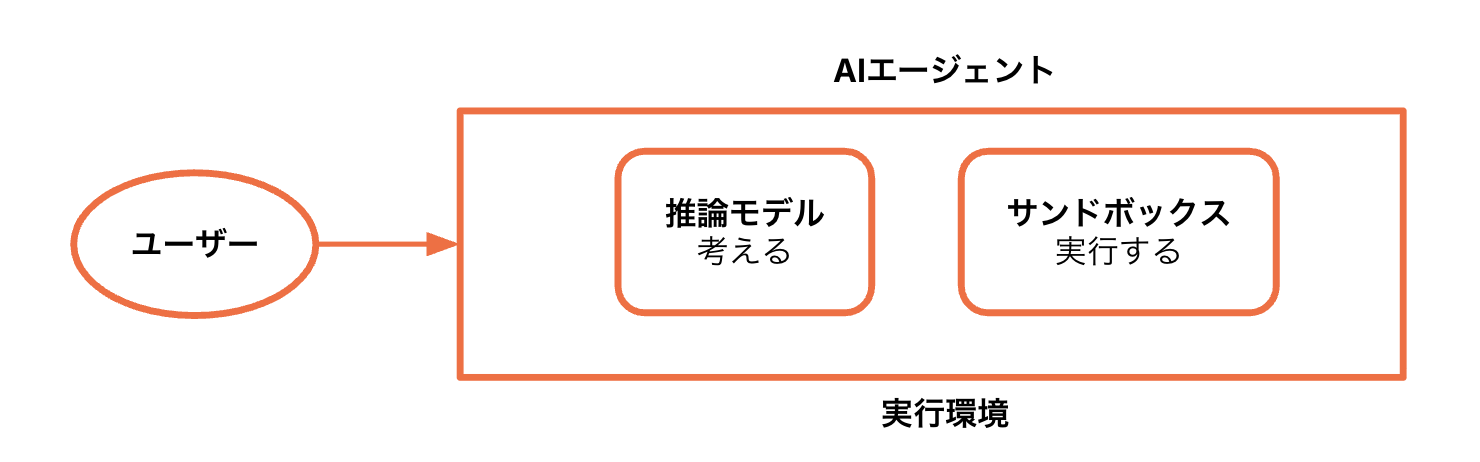
AIエージェントに必要な3つの要素
- 推論モデル - エージェントが考える
- サンドボックス - エージェントが(コードetc.を)実行する
- 実行環境 - エージェントを置く環境
Cloudflareには3つが揃っている
- 推論モデル - Workers AI
- サンドボックス - Sandboxes / Dynamic Workers / Browser Run
- 実行環境 - Workers / Durable Objects / Workflows / Agents SDK
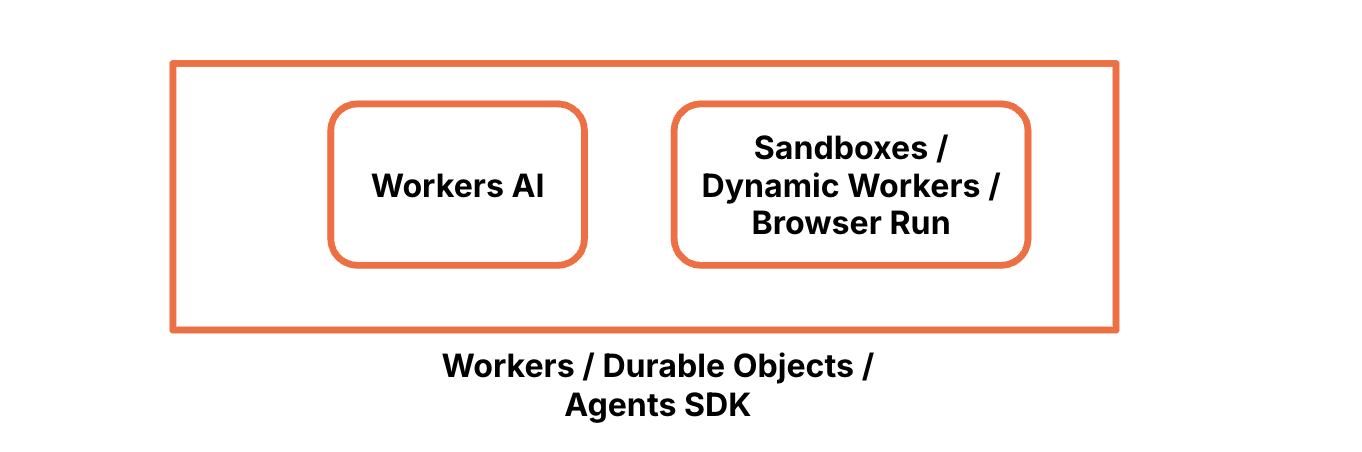
3つの要素
推論モデル
AIプロダクト
- Workers AI
- 他にもAIプロダクト
- AI Gateway - AIアプリとモデルとのゲートウェイ
- Vectorize - ベクターデータベース
- AI Search - 自動的にインデックスする検索機能
Workers AI
- AIエージェントが「考える」ために
- 推論モデルがCloudflareネットワーク上で動く
- GPUを調達しなくていい
- キャパシティを考えなくていい
80以上のモデル
- たくさんのモデル
- たくさんの種類
- LLM
- 画像生成
- スピーチ to テキスト
- Embedding
- etc.
- 外部のモデルも合わせると160以上
::right::
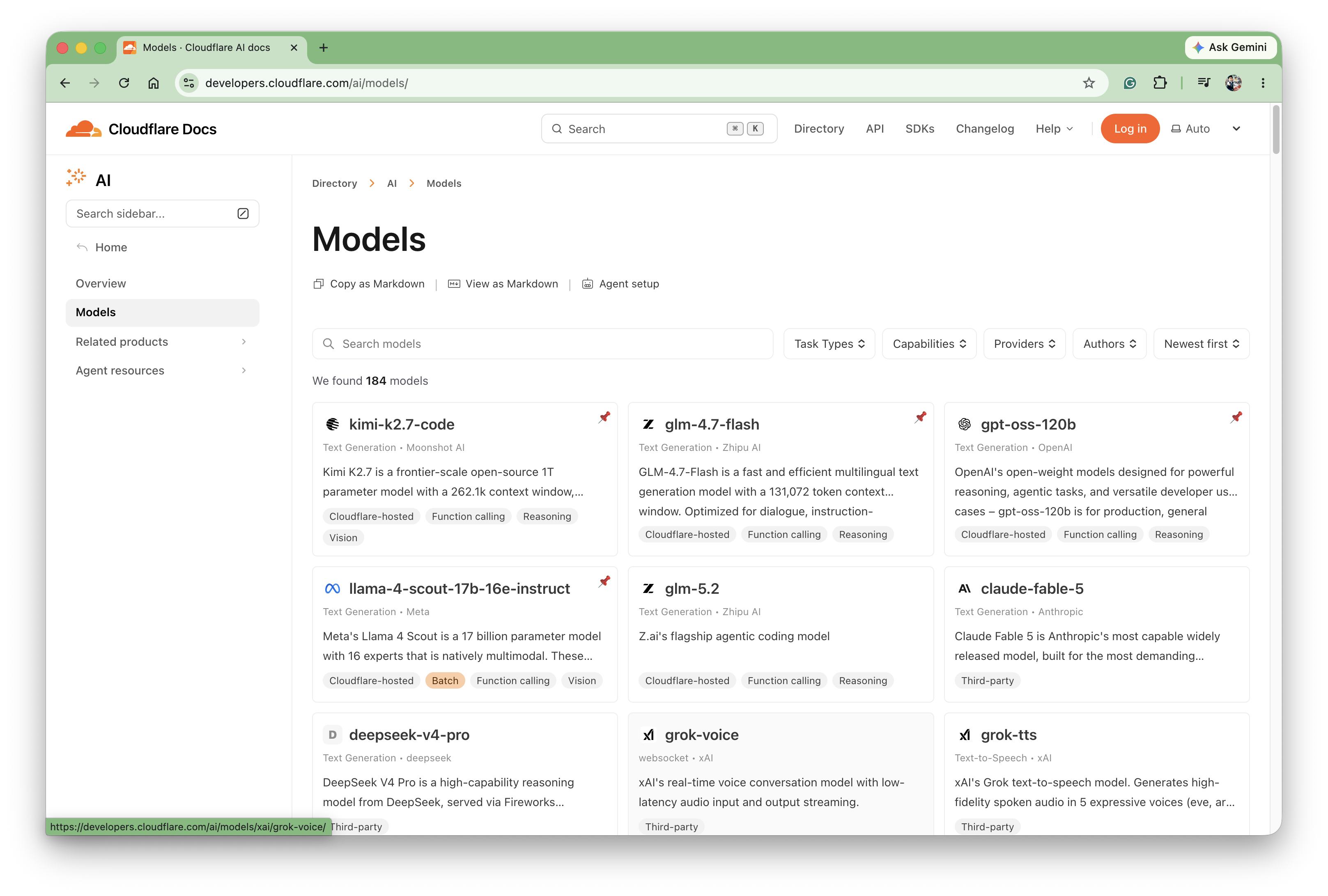
簡単で柔軟な呼び出し
- AI Bindingによる呼び出し
- 他のSDKと互換
const result = env.AI.run(
  '@cf/meta/llama-3.3-70b-instruct-fp8-fast',
  {
    messages: [
      {
        role: 'user',
        content: 'What is the origin of the phrase Hello World',
      },
    ],
  }
)
サンドボックス
サンドボックスの必要性
- AIエージェントは「実際にコードを動かす」「ファイルを書き換える」「Webサイトを操作する」という行動をする
- サンドボックスがないと⋯
- 人間のパソコンの重要なデータを消去してしまう
- サーバーのシステムをクラッシュさせてしまう
- AIが外部に機密データを送信するスクリプトを実行させられてしまう
3つのサンドボックス
- Sandboxes - コンテナ
- Browser Run - ヘッドレスブラウザ
- Dynamic Workers - V8 Isolate
Sandboxes
- Containersを利用したサンドボックス環境、ただし隠蔽されている
- コマンドの実行・ファイルの操作
- バックグラウンド実行、プレビューURLの発行
Pythonコードの実行
import { getSandbox } from '@cloudflare/sandbox'
export { Sandbox } from '@cloudflare/sandbox'

export default {
  async fetch(request: Request, env: Env): Promise<Response> {
    const sandbox = getSandbox(env.Sandbox, 'user-123')
    const result = await sandbox.exec('python --version')

    return Response.json({
      output: result.stdout,
      exitCode: result.exitCode,
      success: result.success,
    })
  },
}
Gitの操作
import { getSandbox } from '@cloudflare/sandbox'
export { Sandbox } from '@cloudflare/sandbox'

export default {
  async fetch(request: Request, env: Env) {
    const sandbox = getSandbox(env.Sandbox, 'agent-session-47')

    await sandbox.gitCheckout('https://github.com/org/repo', {
      targetDir: '/workspace',
      depth: 1,
    })

    return sandbox.exec('npm', ['test'], { stream: true })
  },
}
プレビューURLの発行
import { getSandbox } from '@cloudflare/sandbox'
export { Sandbox } from '@cloudflare/sandbox'

export default {
  async fetch(request: Request, env: Env) {
    const { hostname } = new URL(request.url)

    const sandbox = getSandbox(env.Sandbox, 'agent-session-47')
    await sandbox.startProcess('python -m http.server 8000')
    const exposed = await sandbox.exposePort(8000, { hostname })
    console.log(exposed.url)

    // ...
  },
}
Browser Run
- 旧Browser Rendering、AIエージェント向けに進化
- Cloudflare上でヘッドレスブラウザが動く
- スクリーンショット、PDFの生成、自動化したブラウザタスク
- 2つの方法
- Browser Sessions
- Quick Actions
Broser Sessions
- Cloudflareネットワーク上でPuppeteer、Playwrightが動く
- WorkersもしくはCDP(Chrome DevTools Protocol)から操作
- APIの用意されていない一般のWebサイトを操作する
- 「航空券の予約」「競合サイトの情報収集」
Quick Actions
- ステートレスなブラウザタスクを実行する
- スクリーンショット、PDF生成、スクレイピング
- エンドポイントを叩くか、Bindings
const response = await env.BROWSER.quickAction('screenshot', {
  url: 'https://example.com',
})
Browser Runをサンドボックスとして使う
- 環境の隔離 => 悪意のある・危険なサイトから逃れる
- 使い捨て => クッキーやキャッシュ、セッション情報が残らない
- リソースの節約 => エンドポイントにアクセスするだけ(Quick Actions)
Dynamic Workers
- Workersと同じV8 Isolateで立ち上がる実行環境
- コンテナより「100倍速く、100倍メモリ効率が良い」
- 親となるプログラムWorkerが、実行時にその場で書いたコード文字列を、デプロイ手順なしでダイレクトに実行
Workersの実行環境
export default {
  async fetch(request: Request, env: Env): Promise<Response> {
    const worker = env.LOADER.load({
      compatibilityDate: '2026-05-23',
      mainModule: 'src/index.js',
      modules: {
        'src/index.js': `
          export default {
            fetch(request) {
              return new Response("Hello from a dynamic Worker");
            },
          };
        `,
      },
      globalOutbound: null,
    })

    const entrypoint = worker.getEntrypoint()
    return entrypoint.fetch(request)
  },
}
ユーザーのコードの実行
export default {
  fetch: async (request, env) => {
    const code = await request.text()
    const worker = env.LOADER.load({
      compatibilityDate: '2026-06-01',
      mainModule: 'src/index.js',
      modules: {
        'src/index.js': code,
      },
    })

    const entrypoint = worker.getEntrypoint()
    return entrypoint.fetch('http://dummy')
  },
}
curl -XPOST \
  -d "export default { fetch: () => new Response('from curl') }" \
  http://localhost:8787
実行環境
AIエージェントが動く環境
- Workers
- サーバーレスの実行環境
- V8 Isolateで素早く立ち上がり、独立して動く
- Durable Objects
- ステートフルにする
- 長時間のWebSocketのセッションの保持
- Workflows
- 複数の処理を段階的に実行できる
- 自動的にリトライ、状態の保持
- Agents SDK
- AIエージェントを作るためのTypeScript/JavaScript SDK
Agents SDK
Agents SDKとは?
- WorkersとDurable Objects(上に構築されたSQLite)をAIエージェント向けに使いやすくした
- Cloudflareが公式に提供するSDK
AIエージェントに欲しいもの
- サーバーサイドでのステート管理
- タスクのやり取りを覚えておく => 状態の保持
- デバイス、ユーザー間で共有する => リアルタイムで同期
- ユーザーが離れたら休止する、再開もする => 休止と再開
Agents SDKでできること
- 状態の保持 - エージェントはコンテキストとメモリをそれぞれのDurable Objects内のSQLiteに持つ
- リアルタイムで同期 - 状態が変更されると自動的にWebSocketで接続したクライアントにブロードキャストされる
- 休止と再開 - エージェントがアイドルすると休止し、オンデマンドに立ち上がる。使った時にだけ課金が走る
Agents SDKのコード例
Agentsクラス
import { Agent, callable } from 'agents'

export class CounterAgent extends Agent {
  initialState = { count: 0 }

  @callable()
  increment() {
    this.setState({ count: this.state.count + 1 })
    return this.state.count
  }
}
useAgent
import { useState } from 'react'
import { useAgent } from 'agents/react'

export function CounterWidget() {
  const [count, setCount] = useState(0)

  const agent = useAgent({
    agent: 'CounterAgent',
    onStateUpdate: (state) => setCount(state.count),
  })

  return (
    <>
      {count}
      <button onClick={() => agent.stub.increment()}>+</button>
    </>
  )
}
バニラJavaScriptからの接続
import { AgentClient } from 'agents/client'

const agent = new AgentClient({
  host: 'localhost:5173',
  agent: 'CounterAgent',
})

await agent.call('increment')
カウンターを作ってみる
プロジェクトの初期化
今回はHonoでReactを使う雛形を使う
git clone git@github.com:yusukebe/hono-react-starter.git my-counter
cd my-counter
bun install
その後、package.jsonとwrangler.jsoncのnameを変更
bun create hono@latest my-counter
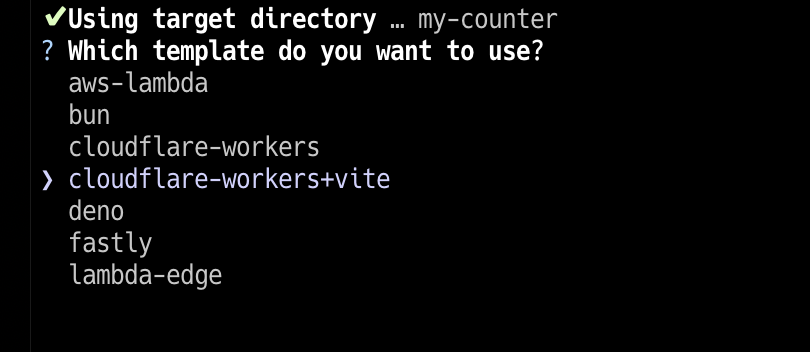
依存関係のインストール
bun add agents hono-agents
Skillsのインストール
必要に応じて
bunx skills add cloudflare/skills
bunx skills add yusukebe/hono-skill
型定義の作成
bun run cf-typegen
Viteの設定
vite.config.ts
import { cloudflare } from '@cloudflare/vite-plugin'
import react from '@vitejs/plugin-react'
import { defineConfig } from 'vite'
import ssrPlugin from 'vite-ssr-components/plugin'
import agents from 'agents/vite'

export default defineConfig({
  build: {
    minify: true,
  },
  plugins: [
    agents(),
    cloudflare(),
    ssrPlugin({
      hotReload: {
        ignore: ['./src/client/**/*.tsx'],
      },
    }),
    react(),
  ],
})
エージェントの定義
src/agents/counter.ts
import { Agent, callable } from 'agents'

export type CounterState = {
  count: number
}

export class CounterAgent extends Agent<
  CloudflareBindings,
  CounterState
> {
  initialState: CounterState = { count: 0 }

  @callable()
  increment() {
    this.setState({ count: this.state.count + 1 })
    return this.state.count
  }

  @callable()
  decrement() {
    this.setState({ count: this.state.count - 1 })
    return this.state.count
  }
}
サーバーでエージェントを有効にする
src/index.tsx
import { agentsMiddleware } from 'hono-agents'
export { CounterAgent } from './agents/couter'

// ...

app.use('*', agentsMiddleware())
Wranglerの設定
wrangler.jsonc
{
  "$schema": "node_modules/wrangler/config-schema.json",
  "name": "my-counter",
  "compatibility_date": "2025-08-03",
  "main": "./src/index.tsx",
  "compatibility_flags": ["nodejs_compat"],
  "durable_objects": {
    "bindings": [
      {
        "name": "CounterAgent",
        "class_name": "CounterAgent"
      }
    ]
  },
  "migrations": [
    {
      "tag": "v1",
      "new_sqlite_classes": ["CounterAgent"]
    }
  ]
}
bun run cf-typegen
カウンターコンポーネントの作成
import { useState } from 'react'
import { useAgent } from 'agents/react'
import type { CounterAgent, CounterState } from '../agents/counter'

export function Counter() {
  const [count, setCount] = useState(0)

  const agent = useAgent<CounterAgent, CounterState>({
    agent: 'CounterAgent',
    onStateUpdate: (state) => setCount(state.count),
  })

  return (
    <>
      {count}
      <button onClick={() => agent.stub.increment()}>+</button>
      <button onClick={() => agent.stub.decrement()}>-</button>
    </>
  )
}
開発サーバーを立ち上げる
bun run dev
デプロイ
bun run deploy
デモ: カウンター
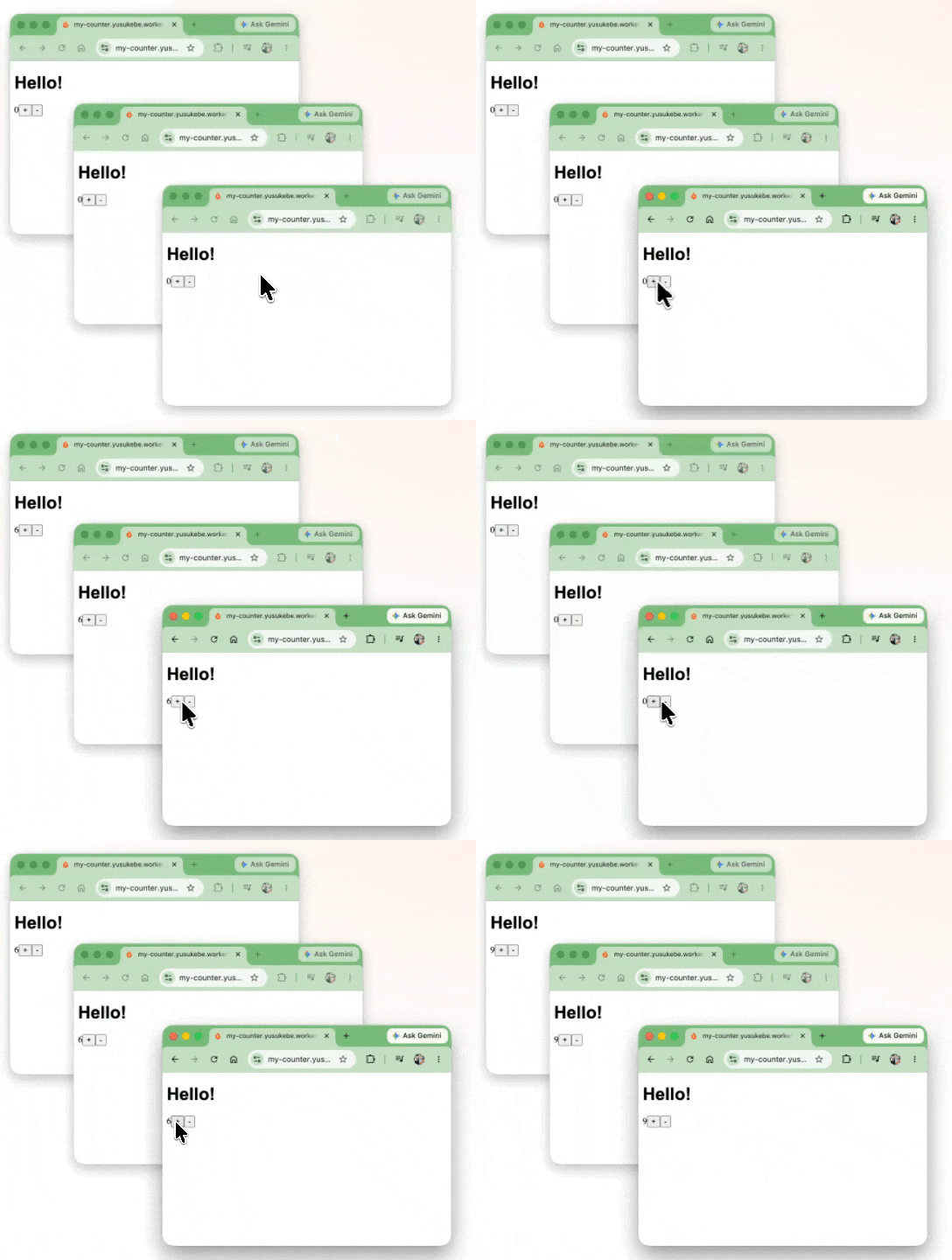
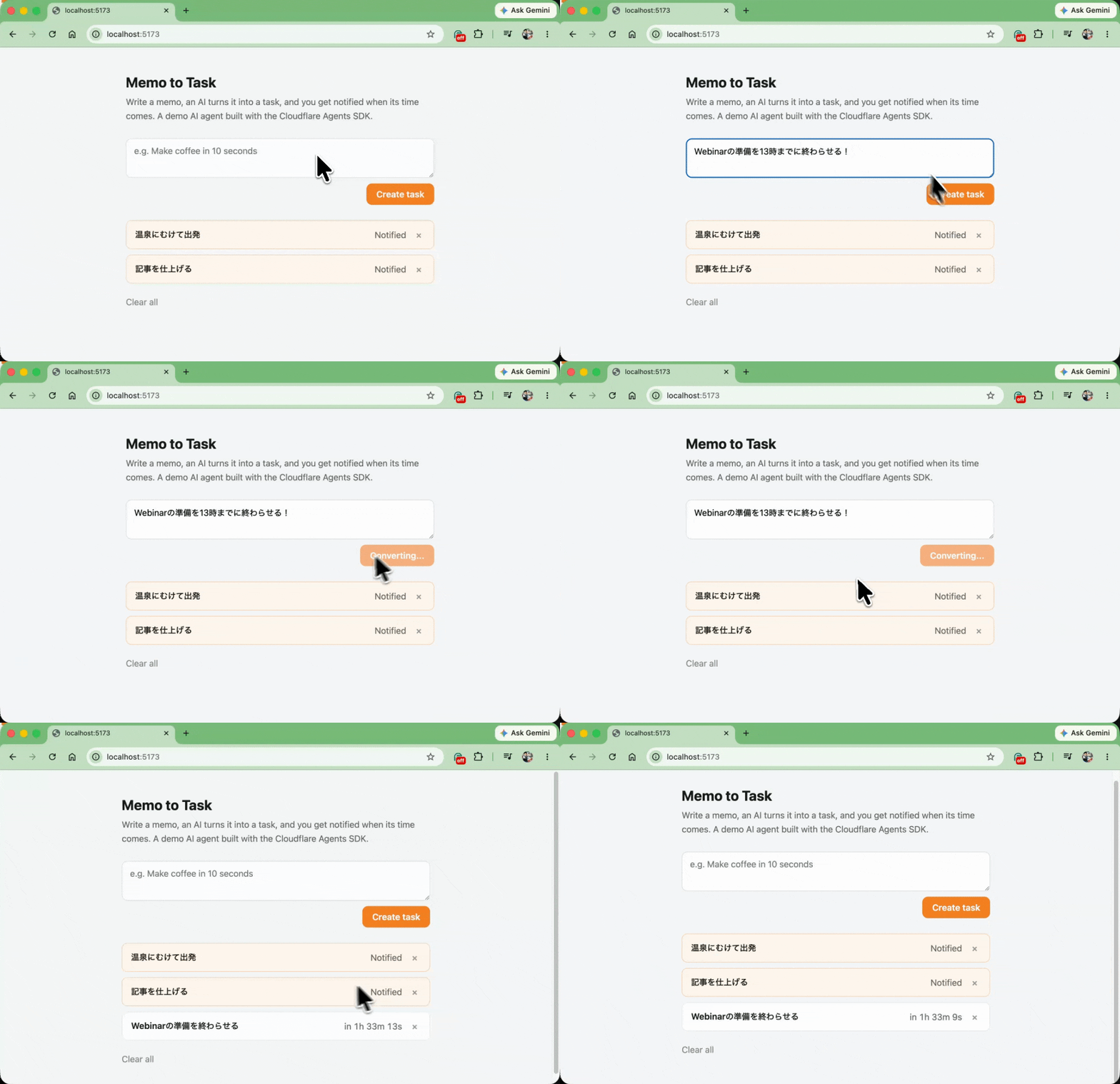
デモ: memo2task
- https://github.com/yusukebe/memo2taske
- 雑なメモをAIがタスクにしてくれる
- タスクのタイトル
- 期限
- ブラウザ通知
Workers AIを使う
src/agents/task.ts
export class TaskAgent extends Agent<CloudflareBindings, TaskState> {
  // ...
  @callable()
  async addMemo(memo: string, timeZone: string) {
    const { title, notifyAt } = await this.parseMemo(memo, timeZone)
    // ...
  }

  private async parseMemo(memo: string, timeZone: string): Promise<{ title: string; notifyAt: string }> {
    const workersai = createWorkersAI({ binding: this.env.AI })

    let result: { title: string; notifyAt: string } | undefined

    await generateText({
      model: workersai('@cf/qwen/qwen3-30b-a3b-fp8'),
      tools: {
        createTask: tool({
          description: 'Submit the final task with its title and notify time.',
          inputSchema: z.object({
            title: z.string().describe('The task title'),
            notifyAt: z.string().describe('ISO 8601 time to notify, with UTC offset')
          }),
          execute: (task) => {
            result = task
            return { ok: true }
          }
        })
      },
      stopWhen: stepCountIs(2),
      system: // メモからタイトル、通知する時間をAIに取ってきてもらう指示
      prompt: `The current time is ${currentTimeInZone(timeZone)}.\nMemo: ${memo}`
    })

    return result
  }
}
Schedule tasksを使う
src/agents/task.ts
export class TaskAgent extends Agent<CloudflareBindings, TaskState> {
  @callable()
  async addMemo(memo: string, timeZone: string) {
    const { title, notifyAt } = await this.parseMemo(memo, timeZone)

    const id = crypto.randomUUID()
    const dueAt = Date.parse(notifyAt)
    const delaySeconds = Math.max(
      1,
      Math.round((dueAt - Date.now()) / 1000)
    )

    // ...
    await this.schedule(delaySeconds, 'notify', { id })
  }
}
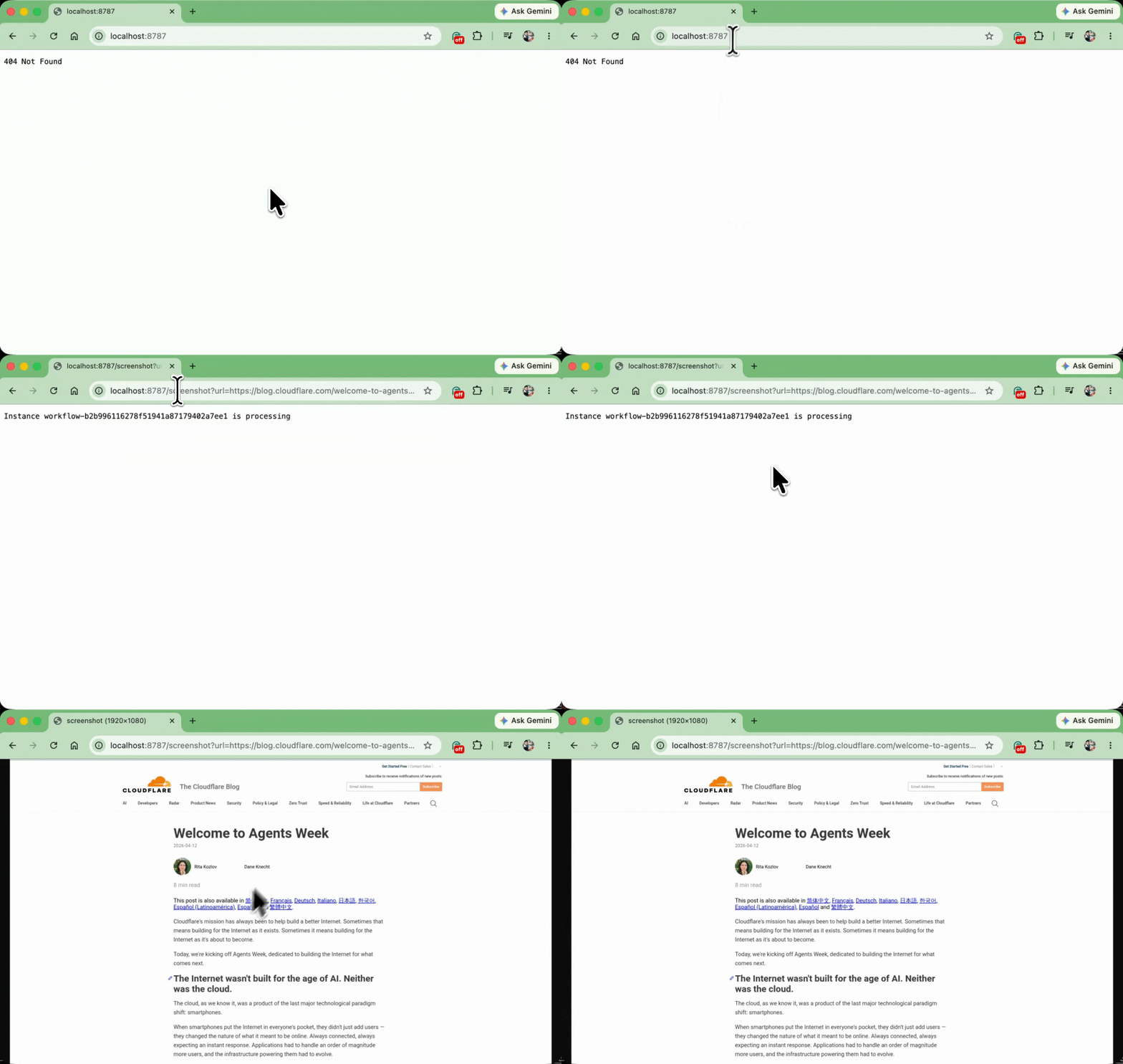
デモ: Screenshot Workflow
- https://github.com/yusukebe/screenshot-workflow
- 指定したURLのスクリーンショットを取る
- レスポンスはすぐに返る
- 完了したらR2に保存
Browser Runを使う
const response = await env.BROWSER.quickAction('screenshot', { url })
const data = await response.arrayBuffer()
const contentType =
  response.headers.get('content-type') ?? 'image/png'
const object = await env.BUCKET.put(url, data, {
  httpMetadata: { contentType },
})
Workflowsを使う
export class ScreenshotWorkflow extends WorkflowEntrypoint<Bindings> {
  async run(
    event: WorkflowEvent<Payload>,
    step: WorkflowStep
  ): Promise<ScreenshotResult> {
    // ...
    const result = await step.do(
      'capture-screenshot',
      {
        retries: {
          limit: 3,
          delay: '5 seconds',
          backoff: 'exponential',
        },
        timeout: '1 minute',
      },
      async (): Promise<ScreenshotResult> => {
        // ...
      }
    )

    await step.do('verify-stored', async () => {
      // ...
    })

    return result
  }
}
サーバーの実装
import { Hono } from 'hono'
import { md5 } from 'hono/utils/crypto'
export { ScreenshotWorkflow } from './workflows/screenshot'

const app = new Hono<{ Bindings: Bindings }>()

app.get('/screenshot', async (c) => {
  const url = c.req.query('url')

  const data = await c.env.BUCKET.get(url)
  if (data) {
    return c.body(await data.arrayBuffer())
  }

  try {
    const instance = await c.env.WORKFLOW.create({
      id: `workflow-${await md5(url)}`,
      params: { url },
    })
    return c.text(`Instance ${instance.id} is processing`)
  } catch (err) {
    if (
      err instanceof Error &&
      err.message.includes('already_exists')
    ) {
      return c.text(`Instance already exists`)
    }
  }
})

export default app
実用的なエージェントへ
これまでの技術を組み合わせてしてエージェントを作る
- AIの推論モデル
- Workers AI
- サンドボックス
- Sandboxes / Dynamic Workers / Browser Run
- 実行環境
- Workers / Workflows / Agents SDK
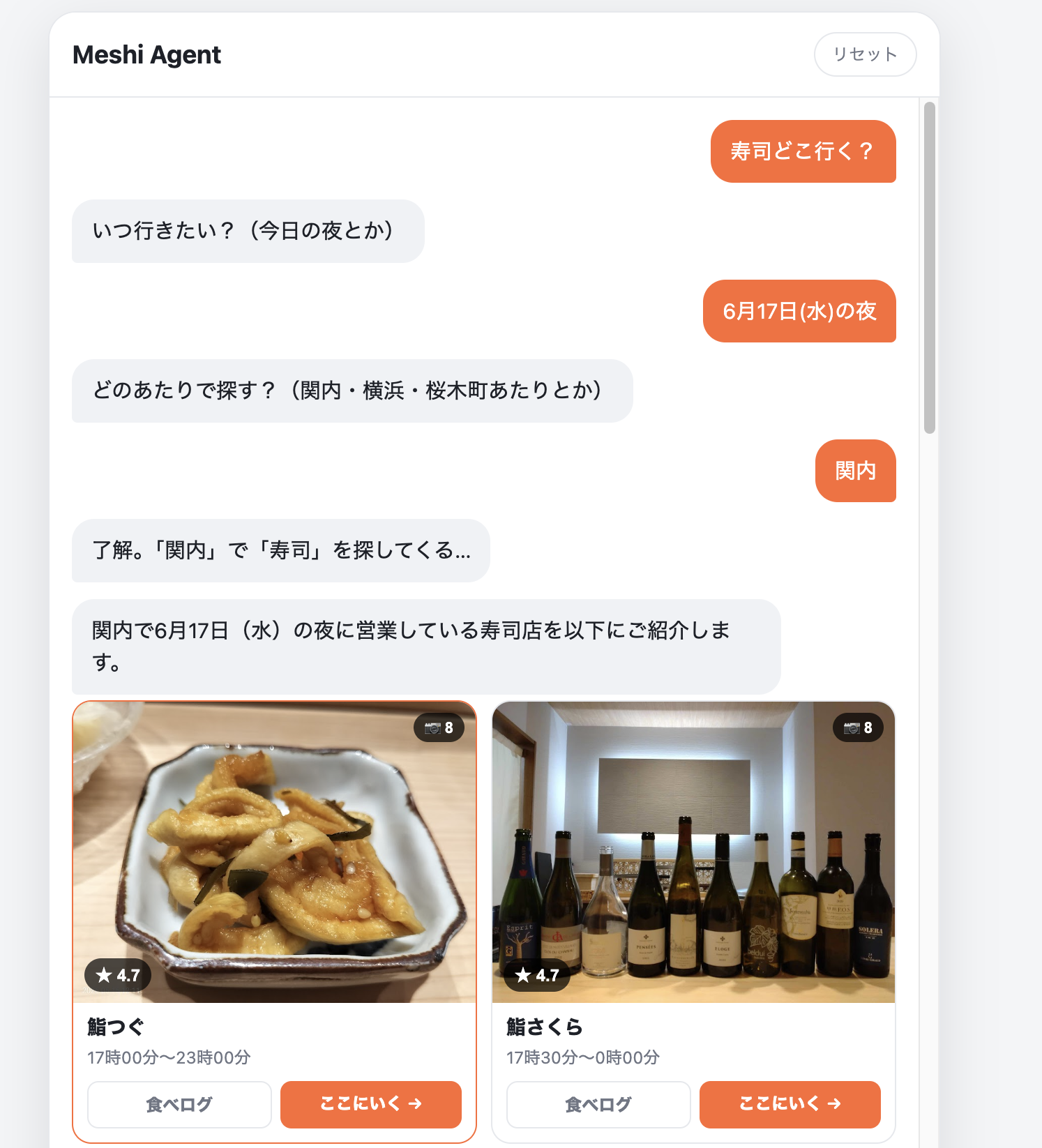
デモ: Meshi Agent
- チャットしてごはん屋さんを探してくれる
- カード表示
- Googleの情報
- 食べログのリンク付き
使った技術
- Workers - 実行環境
- Agents SDK - 会話エージェント
- Durable Objects - 会話の永続化、クライアントの同期
- ステートのブロードキャスト
- Workers AI / OpenAI API - 推論モデル
- Browser Run - 食べログのURLを取得
- Workflows - 検索バッチのステップ管理
- Google Place API => AIが店を選ぶ => 食べログのURLを取得 => カード表示
その他の例
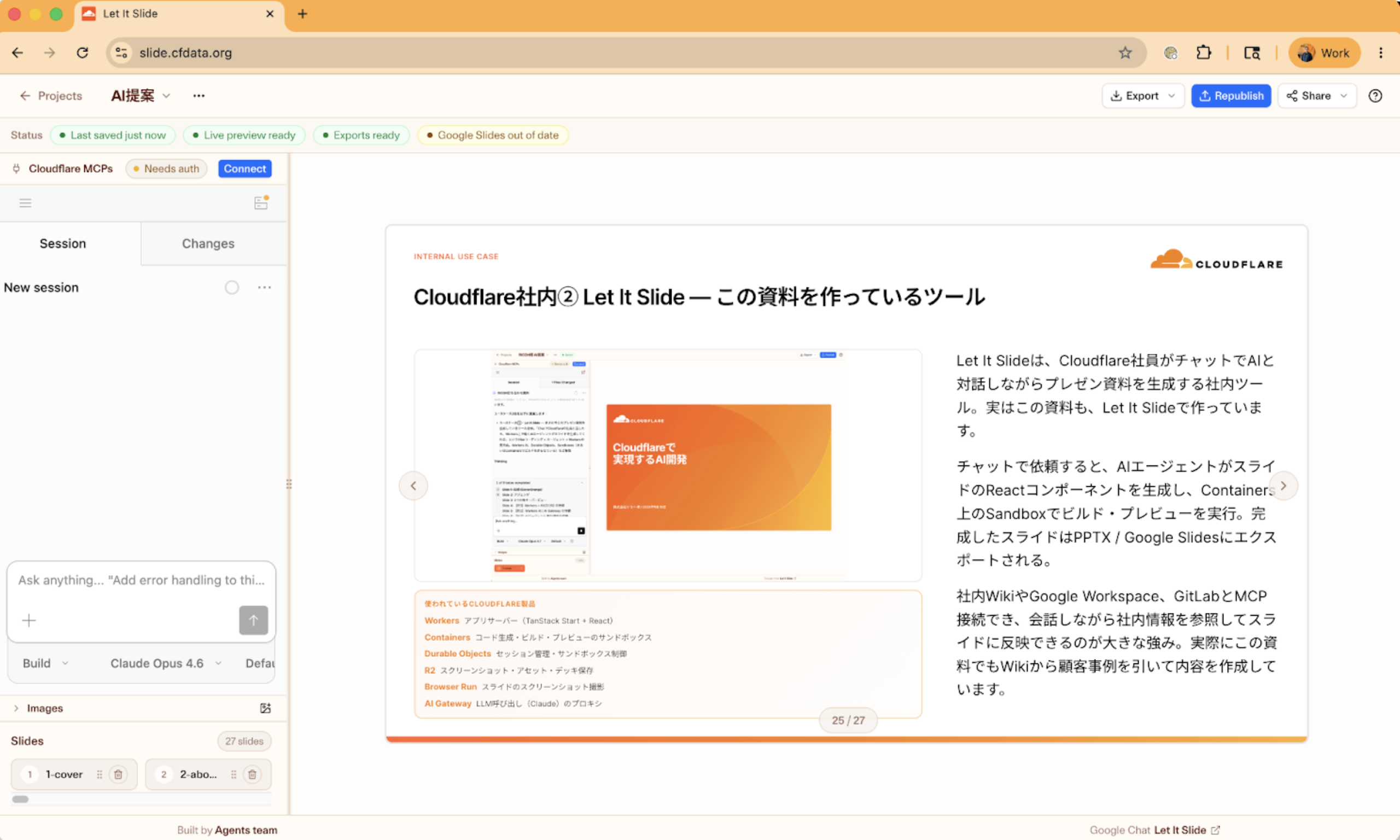
Let It Slide
- Cloudflare社員がチャットでスライドを作成できる
- 社内WikiやレポジトリのMCPと連携
- AIエージェントスタック
- Workers / Sandboxes / Durable Objects / R2 / Browser Run / AI Gateway
::right::
AIを使った開発
Skills
- Cloudflareの公式スキル => https://github.com/cloudflare/skills
- Honoのスキル => https://github.com/yusukebe/hono-skill
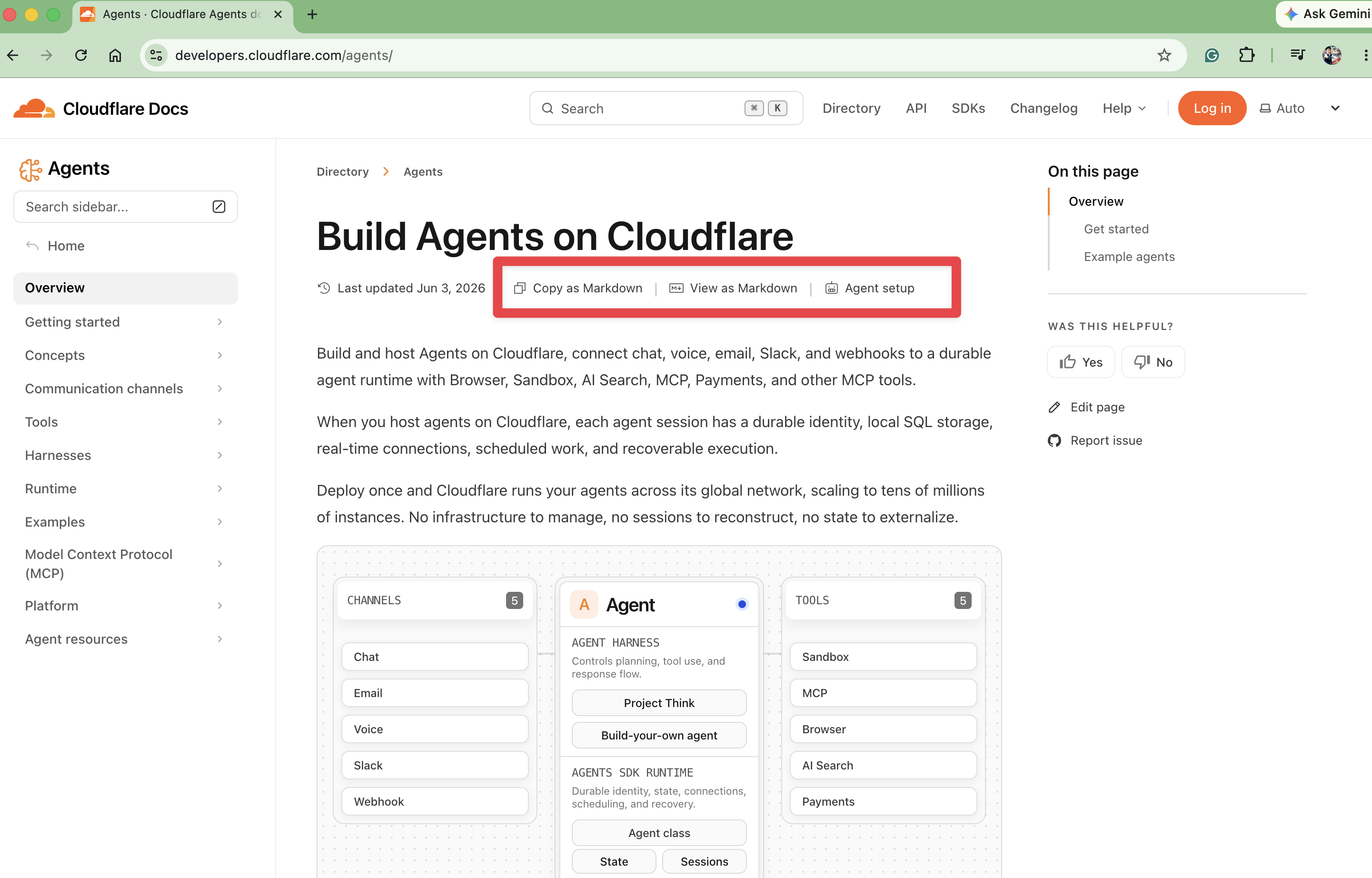
AIに優しいドキュメントサイト
https://developers.cloudflare.com/
まとめ
- CloudflareはAIエージェント構築の最適なプラットフォーム!
- AIエージェントのための要素が揃っている
- デモを通して各要素を説明
- 特にサンドボックス、Agents SDKによるステート管理
CloudflareでAIエージェントを構築しましょう!
Cloudflare Workers Tech Talksについて
Cloudflare Workers / 開発者プラットフォームに特化したミートアップ