Cloudflare Workers ワークショップ
- Yusuke Wada
- 2025-10-28
- workshop.yusuke.run
アジェンダ
- 自己紹介
- Workers イントロダクション
- Hono イントロダクション
- 基本編
- プロキシ編
- Web API編
- フルスタック編
- AI編
- Honoをより深く知る
- その他
1. 自己紹介
自己紹介
- 和田裕介
- 2023年4月〜 Developer Advocate @ Cloudflare
- ボケて co-founder
- Creator of Hono
- https://x.com/yusukebe
- https://github.com/yusukebe
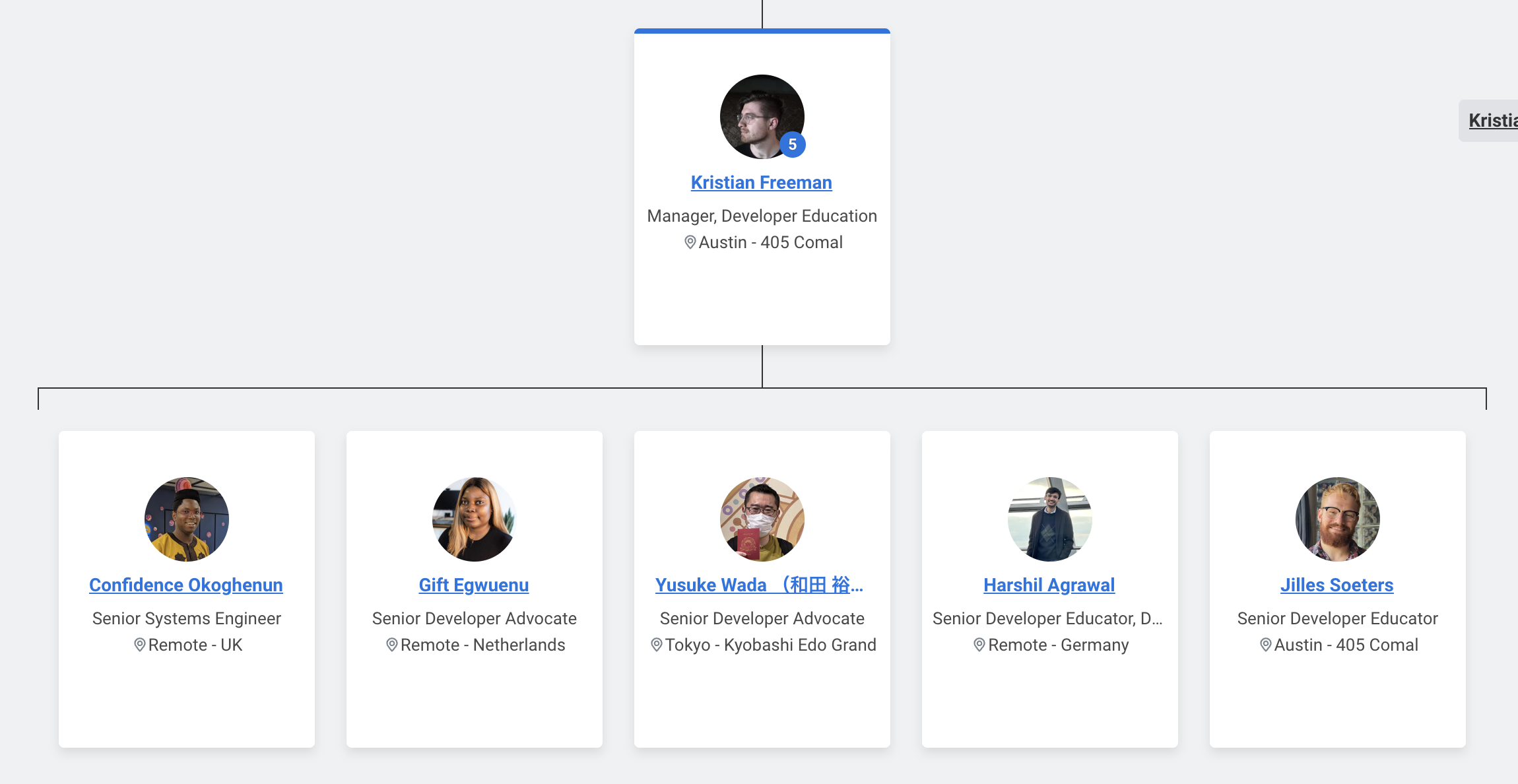
Developer Relations
- Developer GTM 所属
- Emerging Technologies & Incubation に近いところにいる
- Kristianのチームの中
- Austin, Germany, Amsterdam, London, Tokyo
やってること
- Honoの開発
- イベント開催
- イベント登壇
- その他
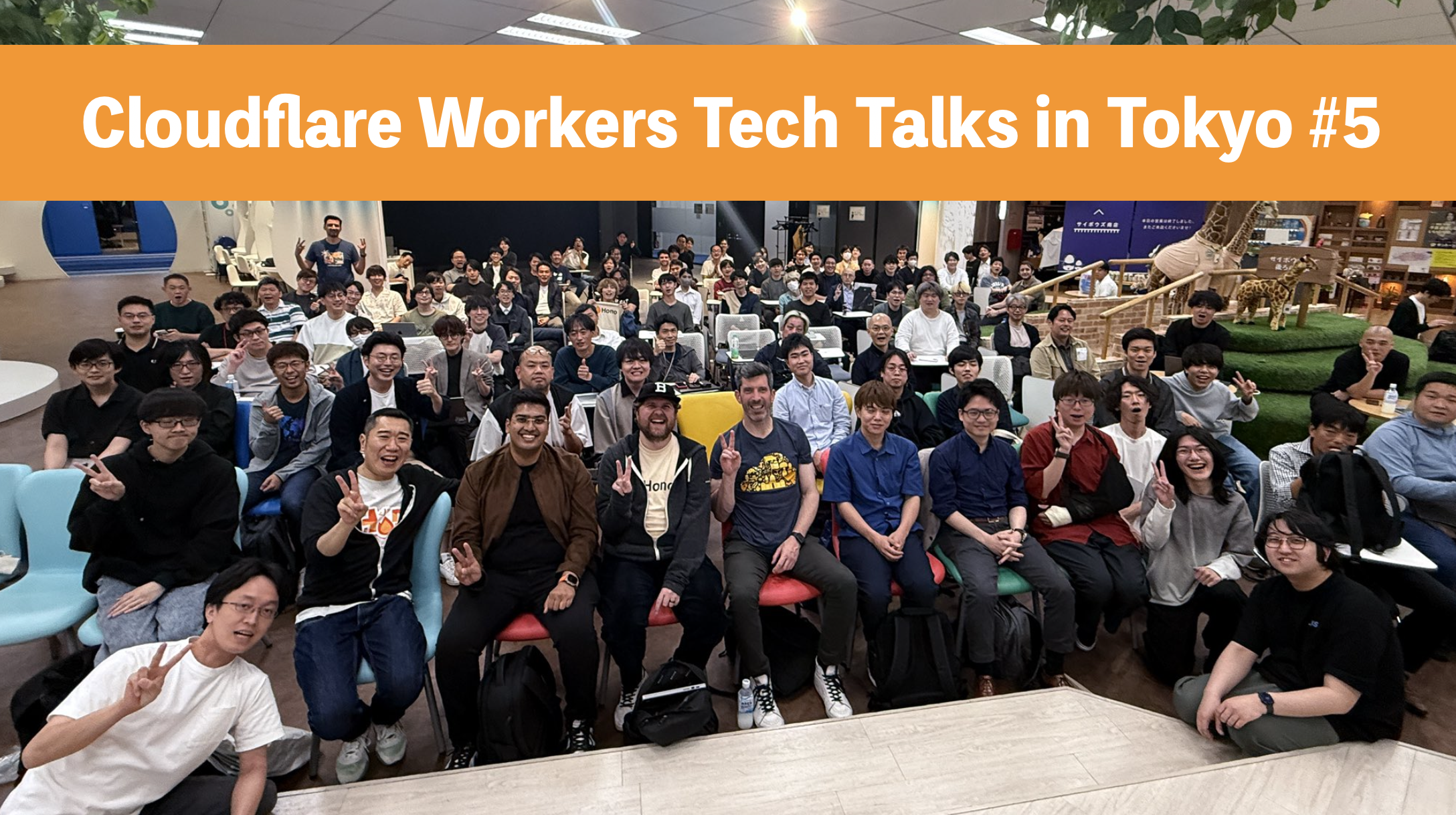
Workers Tech Talks
Cloudflare Workersとその周辺のプロダクトを使う開発者、ライブラリ作者による開発者のためのWorkersに特化したテックトークです。
- Cloudflare Workers Tech Talks in Tokyo #1
- Cloudflare Workers Tech Talks in Tokyo #2
- Cloudflare Workers Tech Talks in Osaka #1
- Cloudflare Workers Tech Talks in Tokyo #3
- Cloudflare Workers Tech Talks in Tokyo #4
- Cloudflare Workers Tech Talks in Osaka #2
- Cloudflare Workers Tech Talks in Tokyo #5
- Cloudflare Workers Tech Talks in Kyoto #1
- Cloudflare Workers Tech Talks in Niigata #1
- Cloudflare Workers Tech Talks in Hokkaido #1
Workers Tech Talks in Tokyo #5
2. Workers イントロダクション
2.1 開発者プラットフォーム
- Cloudflareには開発者プラットフォームがあります
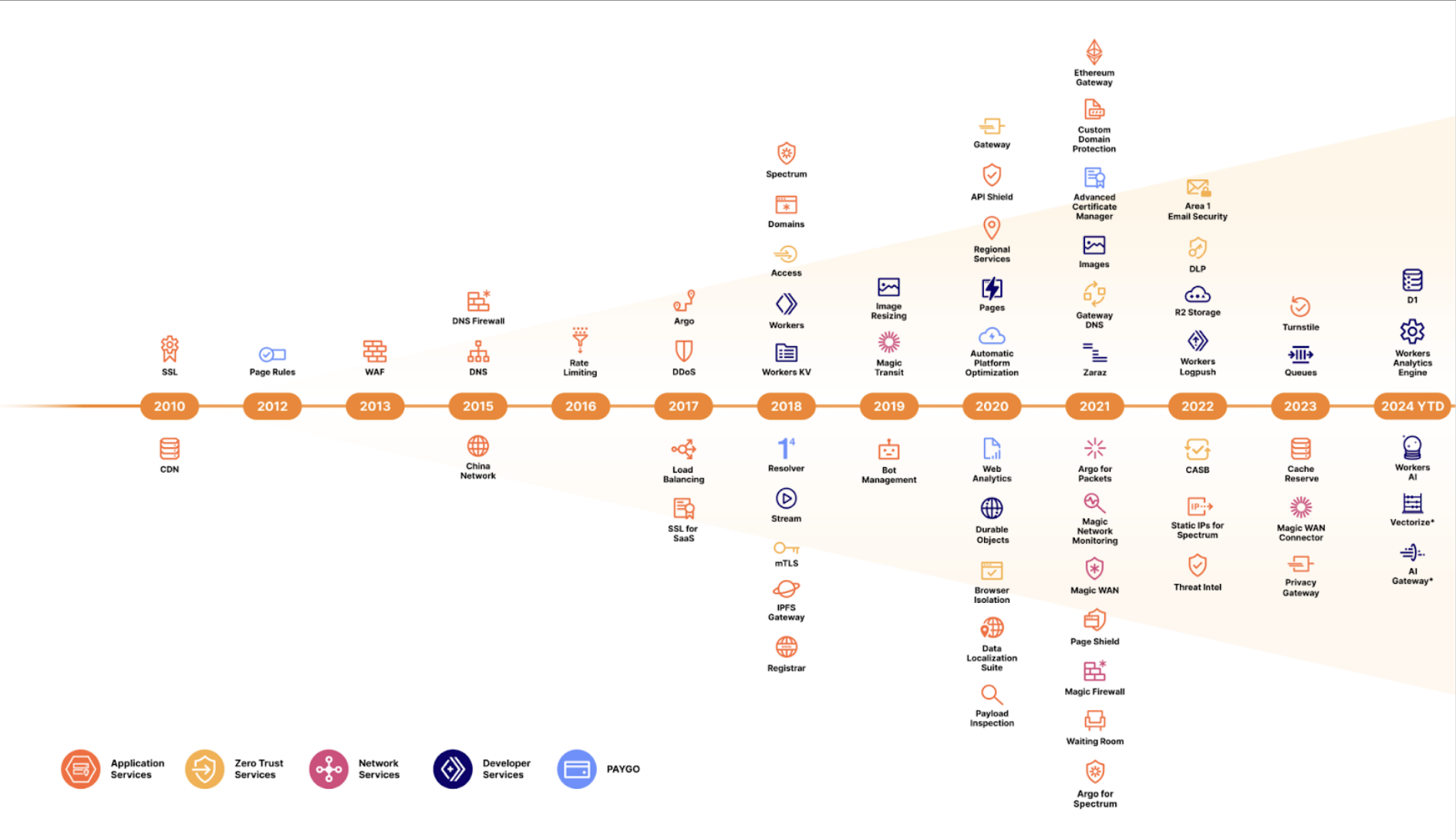
- Cloudflareにあるたくさんのプロダクトの一部
- Cloudflare Workersを中心としたサーバーレスの環境
- 実際に手を動かす「開発者」向け

何ができるのか?
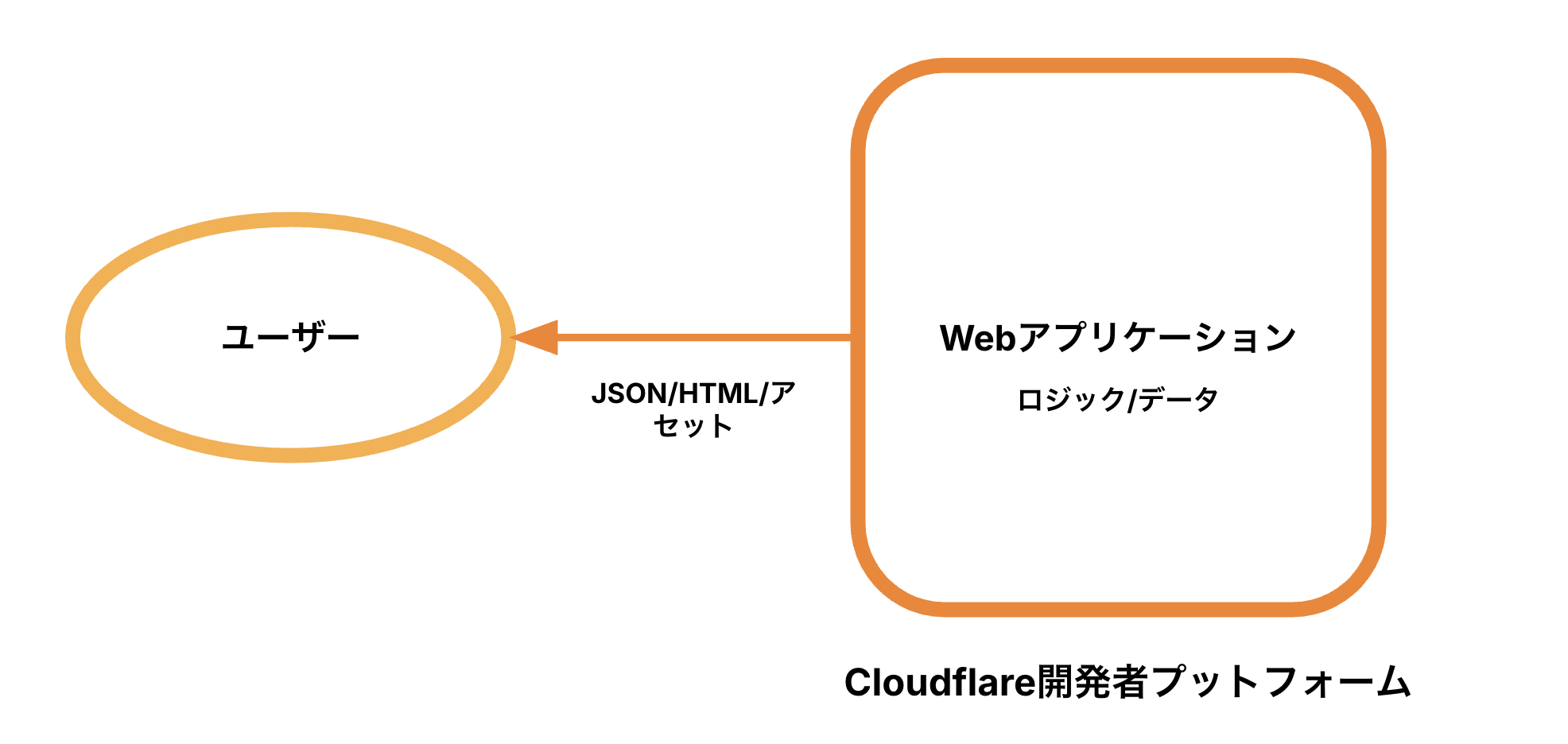
- Webアプリケーションの構築
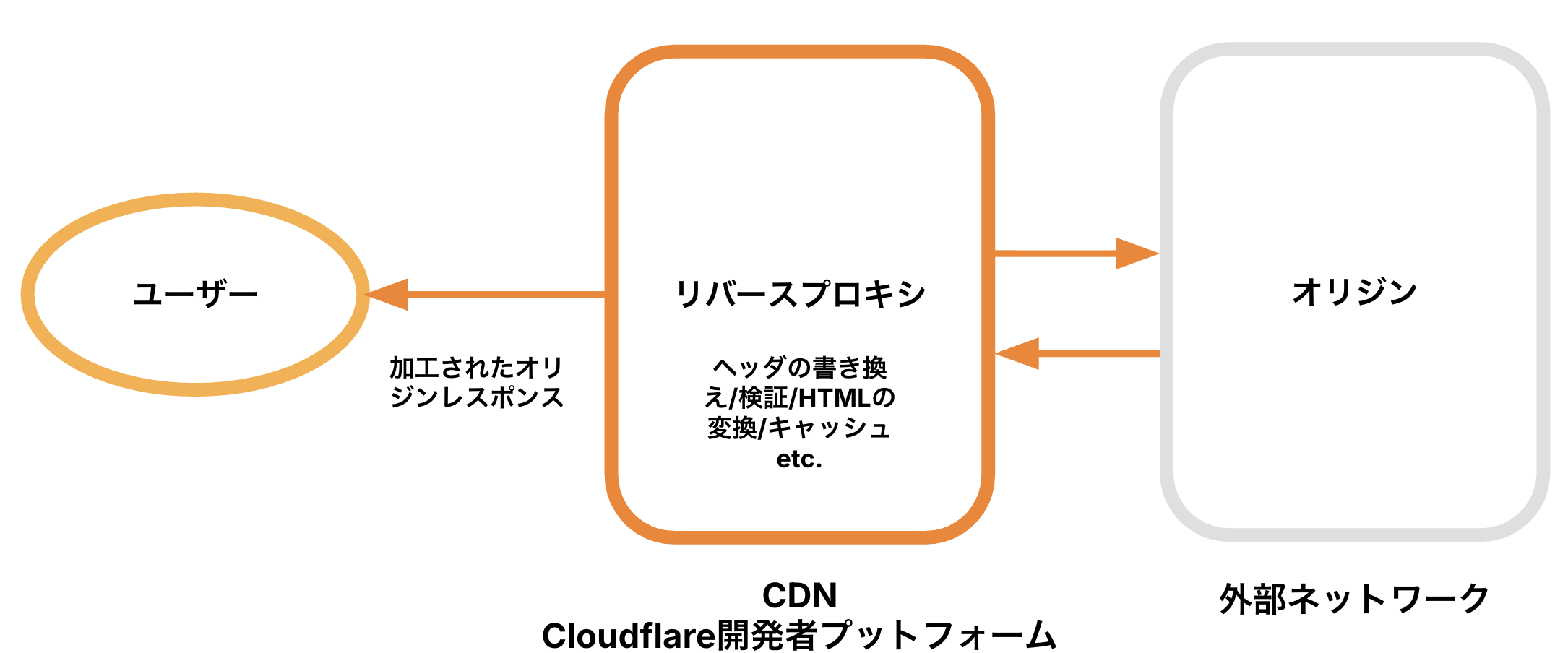
- CDNで実行されるアプリケーション
Webアプリケーションの構築
CDNで実行されるアプリケーション
特徴
Cloudflareの全プロダクト
開発者プラットフォームのプロダクト
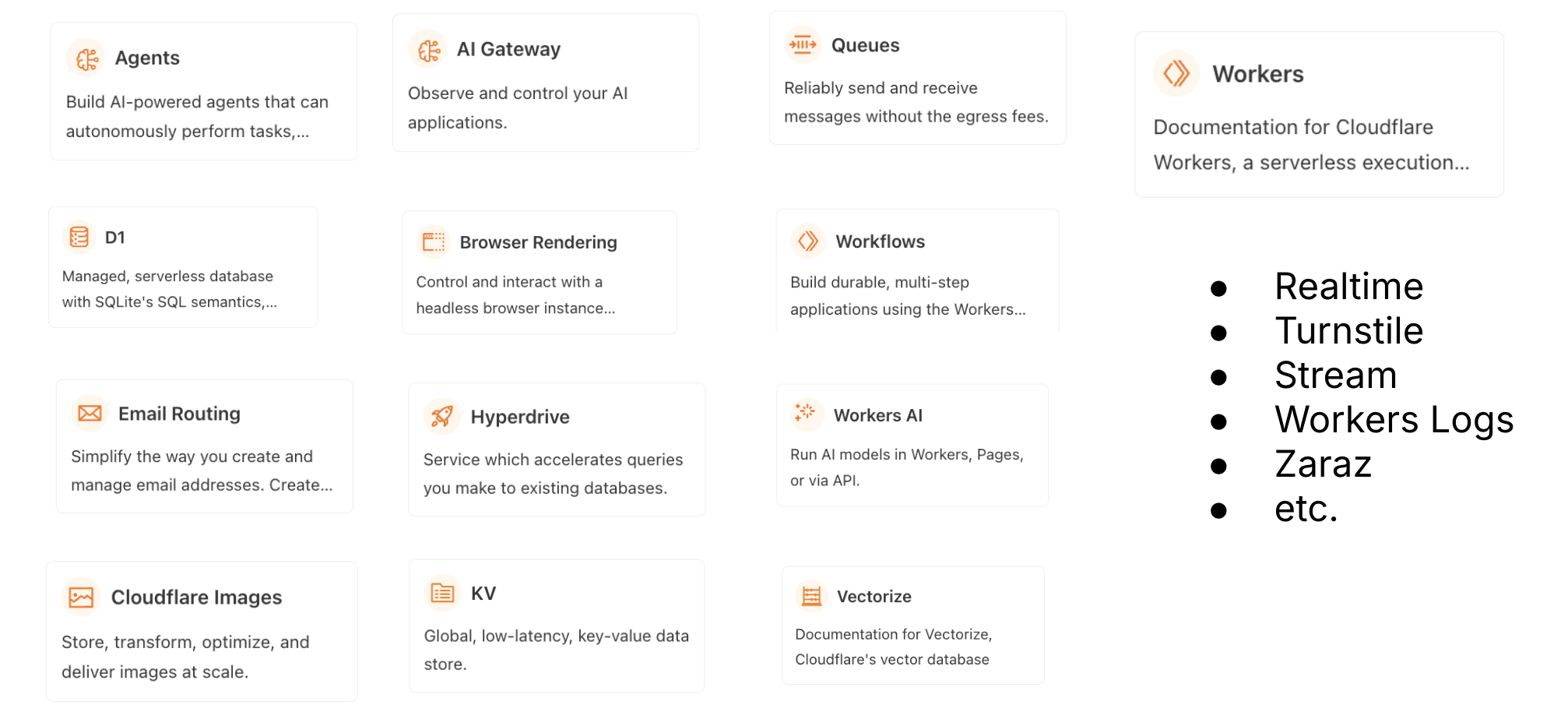
https://developers.cloudflare.com/products/?product-group=Developer+platform
2.2 Cloudflare Workers
- 開発者プラットフォームのベースになる
- 開発者プラットフォームのプロダクトはWorkersが前提で作られている
- Cloudflareのネットワークで実行されるサーバーレス環境
Build serverless applications and deploy instantly across the globe for exceptional performance, reliability, and scale.
サーバーレスアプリケーションを構築し、卓越したパフォーマンス、信頼性、スケールのために世界中に即座にデプロイします。
https://developers.cloudflare.com/workers/
- 設定、メンテ必要なしのサーバーレス環境を提供
- JavaScript/Pythonで記述可能
- WASMも動く
- Bindingsで各プロダクトに接続可能
- Cloudflareのネットワークに即座にデプロイされる
- フリープランで使うことができる
- Workers Playground - https://workers.new
Cloudflare Workersの思想
- Cloudflare Workersのご紹介: エッジでJavaScript Service Workersを実行する
- 2017年9月の記事
- Cloudflareのネットワークをプログラム可能にする
- 検討した結果JavaScriptに行き着く
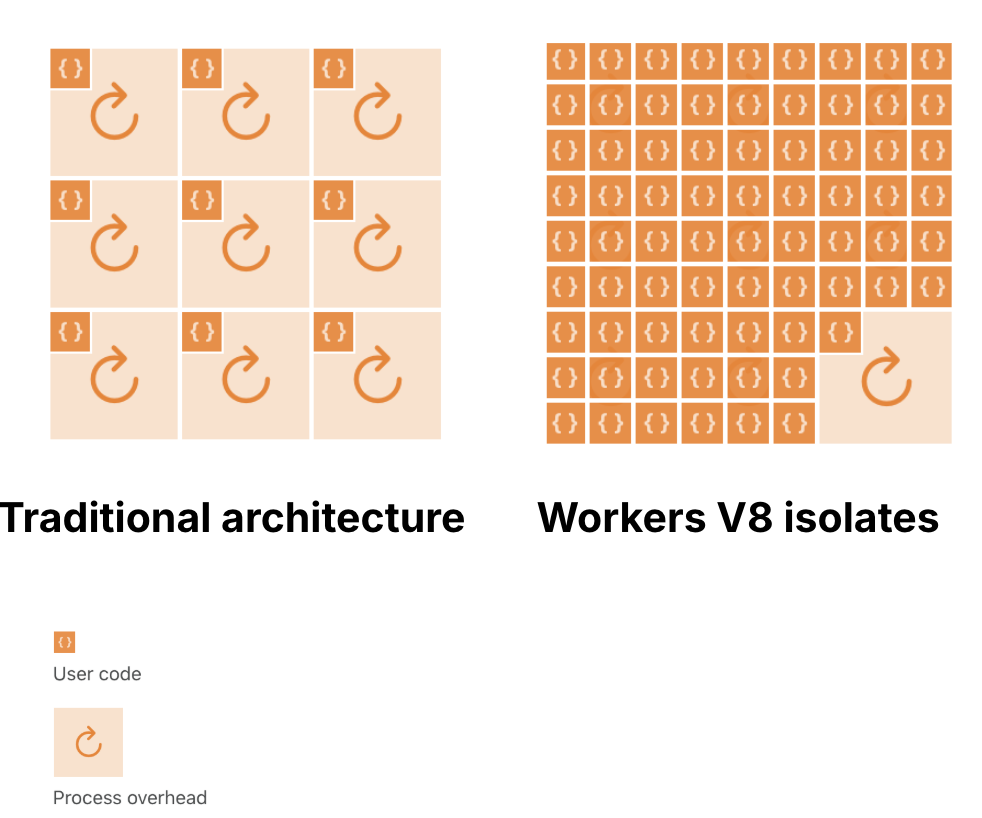
- V8を採用、複数のユーザーのスクリプトを安全に実行
- Service Worker APIを採用、ブラウザ用だが実はサーバーサイドにも適している
- Web APIとして賢く設計されている
- コンテナではできないことができる
- スタートアップが速い
- コールドスタートがない
- CPUスロットリングがない
- リソースのリミットを考える必要がない
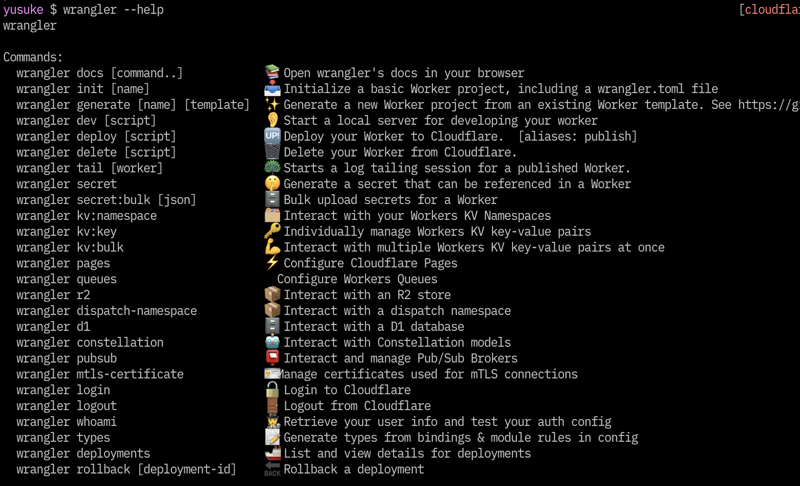
Wrangler
- WorkersのためのCLI
- Workersプロジェクトの作成、テスト、デプロイ
- Pagesでも使用
- Bindingsの管理や
tailなども
2.3 Bindings
CloudflareのプロダクトとWorkersを結ぶ
- KV
- Durable Objects
- R2
- D1
- Service Bindings
- Queue
- Workers AI
- Containers
- など
以下プロダクトの説明
KV
- 素朴なAPIを備えたKey-Value store
- アクセスされたらキャッシュされる
- キャッシュされると静的ファイルのように速い
- 書き込み後の反映に60秒かかることもある
- How KV works
Durable Objects
- ストレージを持ったWorkers
- チャットなど、リアルアイム、動的コンテンツ
- KVは静的コンテンツや設定、DOは動的な状態管理
- Cloudflare Durable Objects
R2
- ストレージサービス
- データエグレスが無料
- AWS S3のAPIと互換性がある
- フロントにWorkersを置くことができる
- Cloudflare R2
D1
- Workersから利用可能なSQLデータベース
- Cloudflare D1
Service Bindings
- Workers間の通信処理を可能にする
- Publicなインターネットを経由しない
- Workersでマイクロサービスを作る
- Service bindings
Queue
- メッセージの送受信が可能
- オープンベータ
queueで受け取り- Cloudflare Queues
- 自ドメインのカスタムメールアドレスを使用
- 受信したメールを受信ボックスへルーティング
emailで受け取り- Cloudflare Email Routing
2.4 Workersを知るために
リソース
3. Hono イントロダクション
3.1 Honoとは?
副題
Fast, lightweight, built on Web Standards. Support for any JavaScript runtime.
3.2 ユースケース
- Web APIの作成
- バックエンドサーバーのプロキシ
- CDNのフロント
- ライブラリのベースサーバー
- フルスタックアプリ
3.3 どこで使われているか?
- Nodecraft
- OpenStatus
- Unkey
- Goens
- NOT A HOTEL
- CyberAgent
- Shift
- Hanabi.rest
- BaseAI
- Mastra
- その他
Who is using Hono in production?
3.4 5つの特徴
- 速い 🚀 - RegExpRouterはマジで速い。リニアにルーティングしません。
- 軽量 🪶 -
hono/tinyプリセットは12kB。HonoはWeb Standard APIのみを使っていて依存0。 - マルチランタイム 🌍 - Cloudflare Workers, Fastly Compute, Deno, Bun, AWS Lambda, or Node.js。同じコードが全てのランタイム/プラットフォームで動きます。
- 揃っている 🔋 - Honoにはビルトインミドルウェア、カスタムミドルウェア、3rdパーティミドルウェアがあります。やりたいことが揃っています。
- 楽しいDX 🛠️ - 綺麗なAPI。そしてTypeScriptのサポート。そう型があるのです。
3.5 速い
- 5つのルーターを備えている
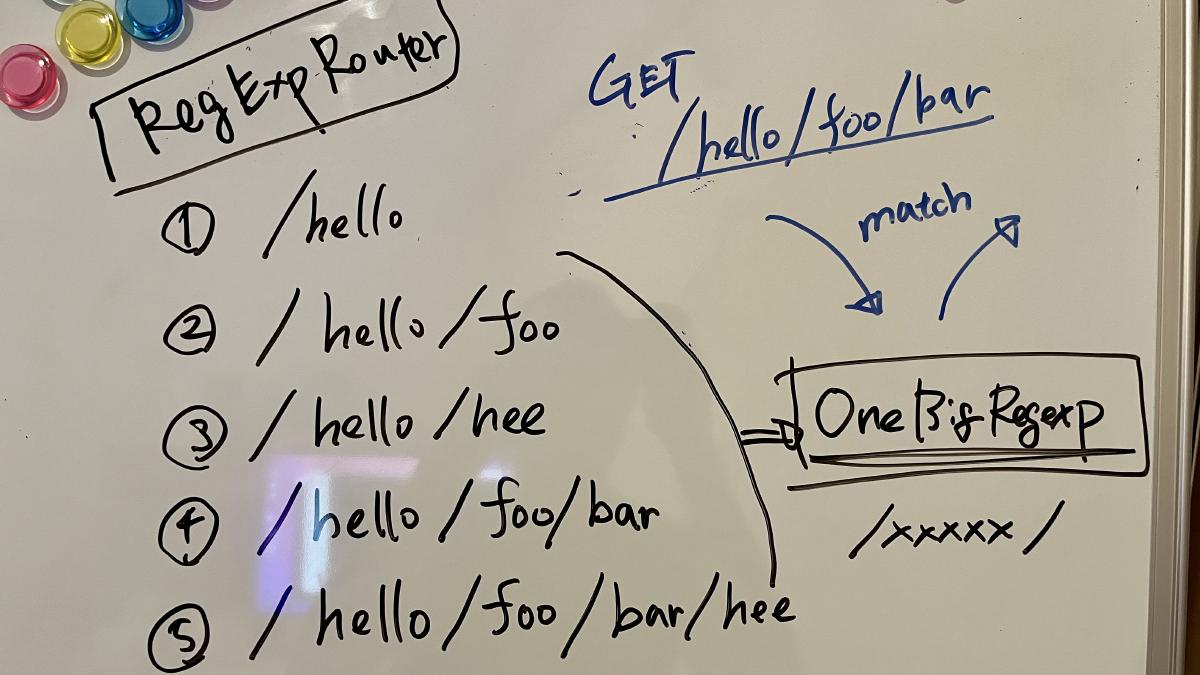
- RegExpRouter - ルーティングをひとつの大きな正規表現にする。JavaScript界でほぼ最速
- TriRouter - Trie木を利用。リファレンス実装
- SmartRouter - 登録されたルーターの中から最適なルーターを自動的に選ぶ
- LinearRouter - 登録が最速
- PatternRouter - 一番サイズが小さい。1.3KB
RegExpRouter
- RegExpRouterは「RegExp」といってもExpressなどで使われているpath-to-regexpとは違う
- path-to-regexpはリニアにマッチさせるので、ルートごとに正規表現が走る
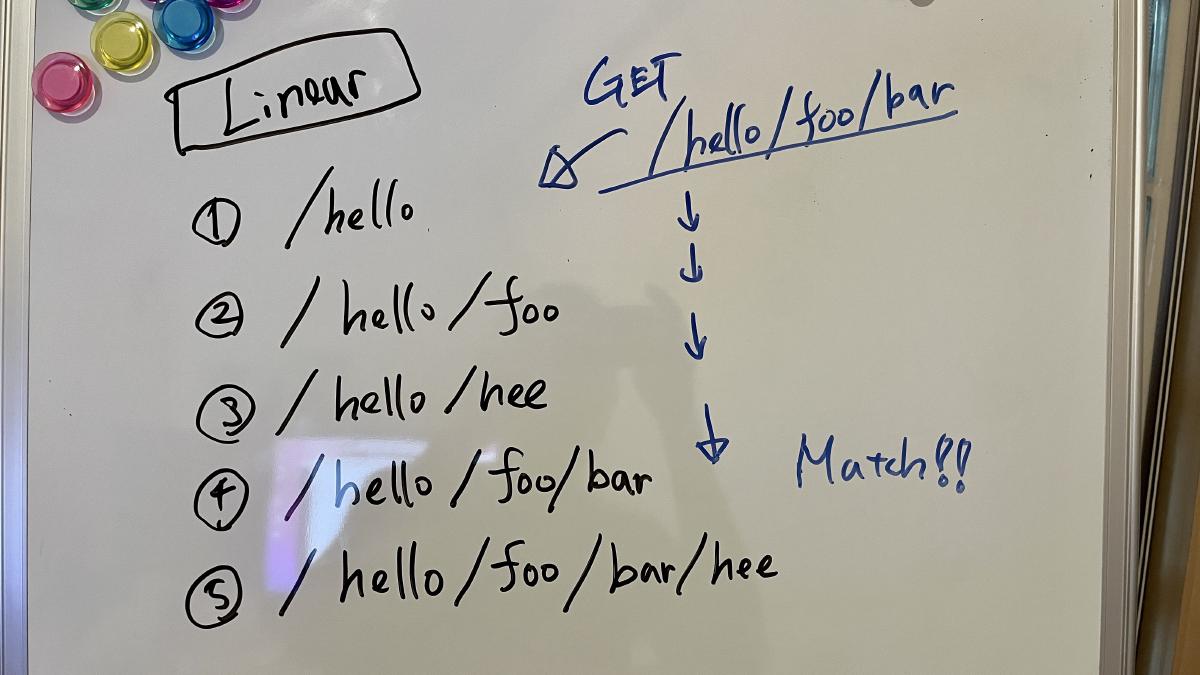
- RegExpRouterは予め一つの大きな正規表現を作り一度でマッチさせる
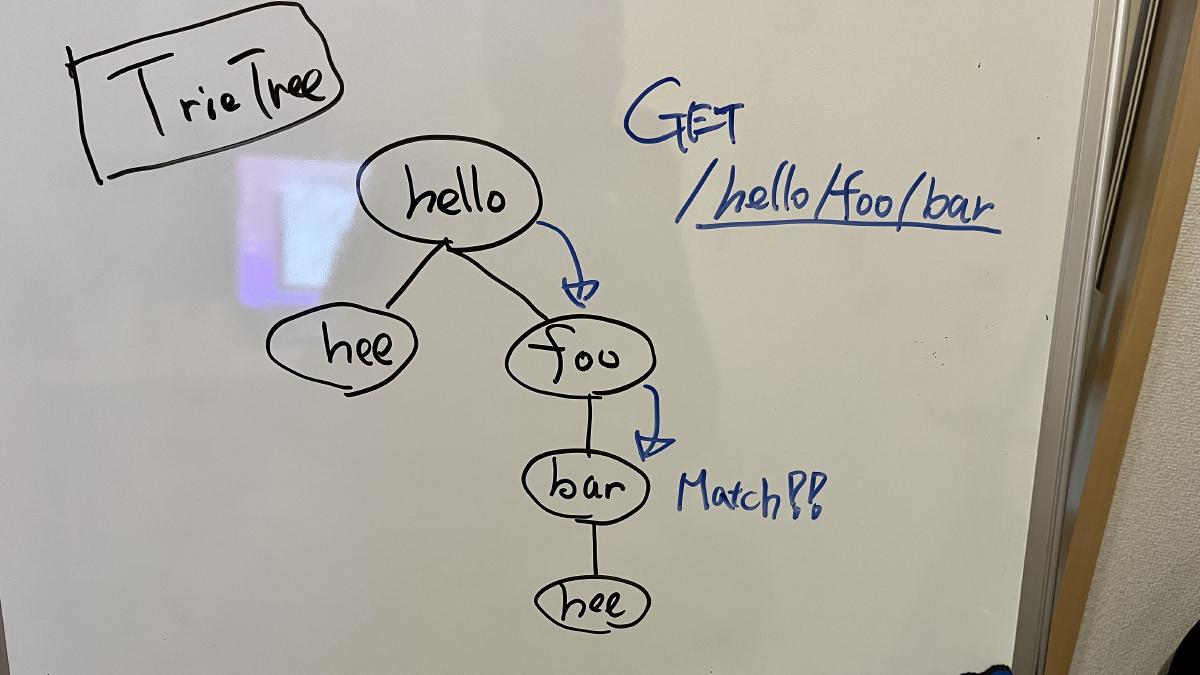
TriRouter
- Trie木の構造を使ったルーター
- リニアにマッチさせるより速いが、Honoのルーティングの都合上、一般的な木構造のルーターと比べると遅い
- このルーターを正とする、リファレンス実装になっている
SmartRouter
- 複数のルーターを登録しておくと、そのアプリケーションに最適なルーターを選んでそれを使い続ける
readonly defaultRouter: Router = new SmartRouter({
  routers: [new RegExpRouter(), new TrieRouter()],
})
LinearRouter
- 登録が速い
• GET /user/lookup/username/hey
----------------------------------------------------- -----------------------------
LinearRouter     1.82 µs/iter      (1.7 µs … 2.04 µs)   1.84 µs   2.04 µs   2.04 µs
MedleyRouter     4.44 µs/iter     (4.34 µs … 4.54 µs)   4.48 µs   4.54 µs   4.54 µs
FindMyWay       60.36 µs/iter      (45.5 µs … 1.9 ms)  59.88 µs  78.13 µs  82.92 µs
KoaTreeRouter    3.81 µs/iter     (3.73 µs … 3.87 µs)   3.84 µs   3.87 µs   3.87 µs
TrekRouter       5.84 µs/iter     (5.75 µs … 6.04 µs)   5.86 µs   6.04 µs   6.04 µs

summary for GET /user/lookup/username/hey
  LinearRouter
   2.1x faster than KoaTreeRouter
   2.45x faster than MedleyRouter
   3.21x faster than TrekRouter
   33.24x faster than FindMyWay
PatternRouter
- とにかく小さい
ベンチマーク
- https://github.com/honojs/hono/tree/main/benchmarks/routers
対象のルーター
- find-my-way
- express
- koa-router
- koa-tree-router
- trek-router
- @medley/router
- Memoirist
- Hono RegExpRouter
- Hono TrieRouter
結果
• all together
---------------------------------------------------------------------------- -----------------------------
Hono RegExpRouter                      460.6 ns/iter (429.69 ns … 525.88 ns)  479.5 ns 520.63 ns 525.88 ns
Hono TrieRouter                         1.52 µs/iter     (1.39 µs … 1.73 µs)   1.56 µs   1.73 µs   1.73 µs
@medley/router                        618.21 ns/iter (591.08 ns … 764.25 ns) 636.08 ns 764.25 ns 764.25 ns
find-my-way                           959.15 ns/iter   (892.79 ns … 1.02 µs) 979.02 ns   1.02 µs   1.02 µs
koa-tree-router                       926.79 ns/iter   (866.17 ns … 1.04 µs) 943.57 ns   1.04 µs   1.04 µs
trek-router                             1.76 µs/iter     (1.69 µs … 1.84 µs)   1.79 µs   1.84 µs   1.84 µs
express (WARNING: includes handling)    4.02 µs/iter      (3.9 µs … 4.33 µs)   4.06 µs   4.33 µs   4.33 µs
koa-router                              1.39 µs/iter     (1.34 µs … 1.57 µs)   1.41 µs   1.57 µs   1.57 µs
radix3                                763.26 ns/iter (734.77 ns … 902.52 ns)  781.2 ns 902.52 ns 902.52 ns
Memoirist                             540.11 ns/iter (507.38 ns … 699.65 ns) 554.52 ns 697.25 ns 699.65 ns

summary for all together
  Hono RegExpRouter
   1.17x faster than Memoirist
   1.34x faster than @medley/router
   1.66x faster than radix3
   2.01x faster than koa-tree-router
   2.08x faster than find-my-way
   3.02x faster than koa-router
   3.3x faster than Hono TrieRouter
   3.82x faster than trek-router
   8.74x faster than express (WARNING: includes handling)
@usualomaさん
RegExpRouter, SmartRouter, LinearRouter, PatternRouterは @usualomaさん が作りました。 @usualomaさんが発表した資料が参考になります。

3.6 軽量
- 標準で21KB、PatternRouterで13KB
- ちなみにExpressは572KB
- Web StandardのAPIのみを使っていて、外部のライブラリへの依存が0。
プリセット
あらかじめ、おすすめのルーターのセッティングをプリセットとして提供している。
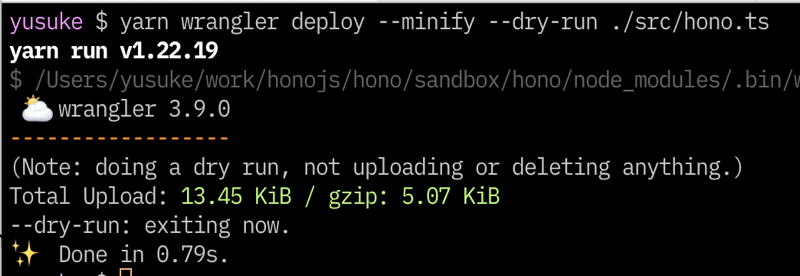
hono: ほとんどのユースケースでオススメです。ルーティング登録がhono/quickより遅いとはいえ、一度登録されれば高いパフォーマンスを発揮します。DenoやBun、それにNode.jsなどを使った常駐型のサーバーには最適です。また、Cloudflare WorkersやDeno Deployでもこのプリセットを使えばいいでしょう。というのもこれらのようなv8 isolateを使った環境では、isolateは起動後しばらく行き続けるからです(時間が決まっていたり、メモリなどの状況に応じて変化したりします)。hono/quick: このプリセットはリクエストのたびにアプリケーションが初期化されるような環境に適しています。hono/tiny: このプリセットは一番ファイルサイズの小さいプリセットです。リソースが限られている環境にはいいでしょう。
3.7 どこでも動く
Web Standard APIs
- Web標準のAPIのみを使用
- Node.jsアダプターはNode.jsのincoming/outgoingをRequest/Responseに変換している
- WinterTCをフォローしている
最低限のコード
export default {
  async fetch() {
    return new Response('Hello World')
  },
}
よく使うAPI
RequestResponseURLURLSearchParamsHeadersFormData- Web API | MDN
スターターのテンプレートは13種類
- aws-lambda
- bun
- cloudflare-pages
- cloudflare-workers
- cloudflare-workers+vite
- deno
- fastly
- lambda-edge
- netlify
- nextjs
- nodejs
- vercel
- x-basic
CIでは9種類のランタイムのテストが走る
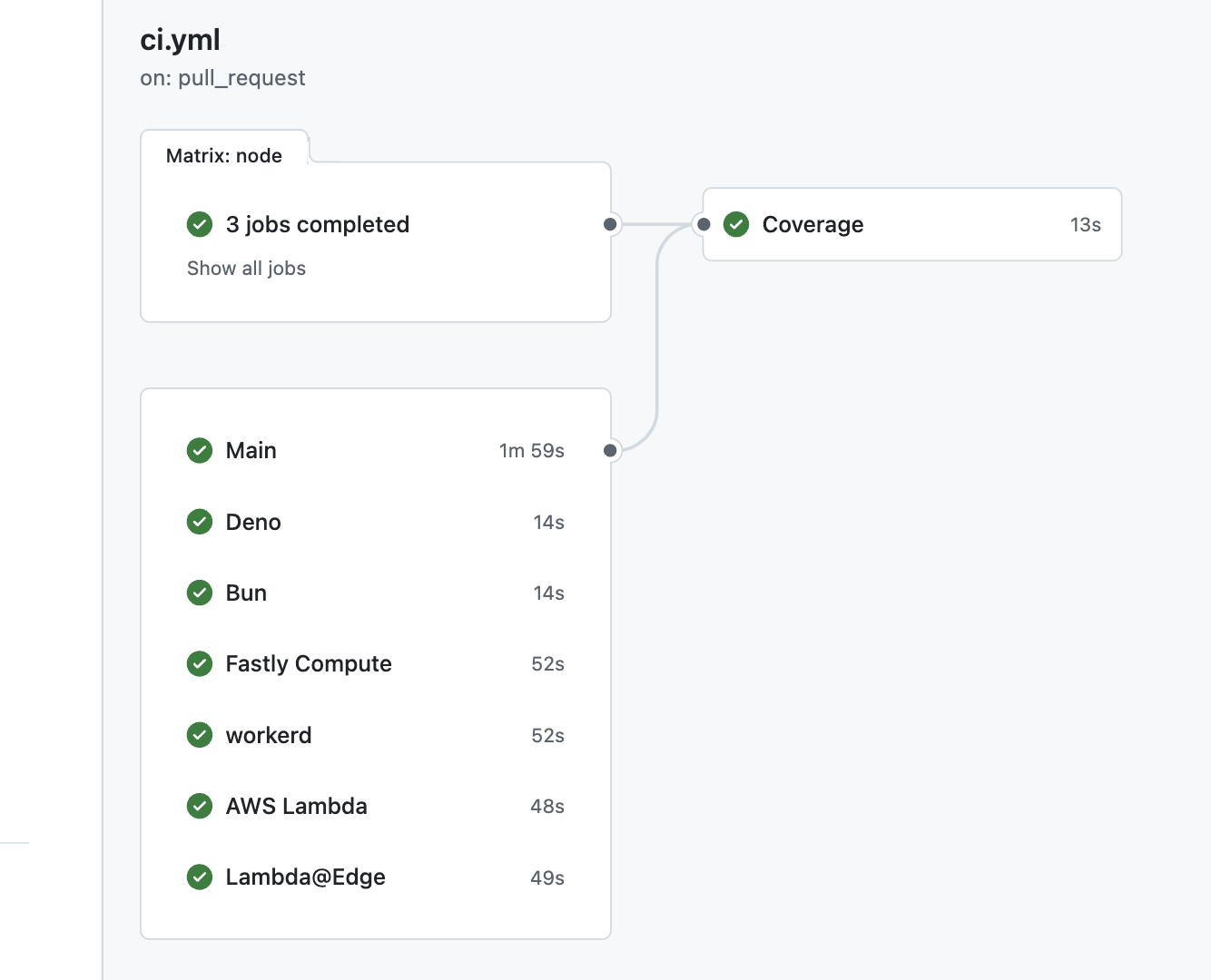
エントリポイントが違うだけ
Cloudflare Workers & Bun & Vercel
import { Hono } from 'hono'
const app = new Hono()

app.get('/', (c) => c.text('Hello Hono!'))

export default app
Fastly Compute
import { Hono } from 'hono'
import { fire } from '@fastly/hono-fastly-compute'

const app = new Hono()

app.get('/', (c) => c.text('Hello Fastly!'))

fire(app)
Deno
import { Hono } from '@hono/hono'

const app = new Hono()

app.get('/', (c) => c.text('Hello Hono!'))

Deno.serve(app.fetch)
Netlify
import { Hono } from 'jsr:@hono/hono'
import { handle } from 'jsr:@hono/hono/netlify'

const app = new Hono()

app.get('/', (c) => {
  return c.text('Hello Hono!')
})

export default handle(app)
AWS Lambda
import { Hono } from 'hono'
import { handle } from 'hono/aws-lambda'

const app = new Hono()

app.get('/', (c) => c.text('Hello Hono!'))

export const handler = handle(app)
Lambda@Edge
import { Hono } from 'hono'
import { handle } from 'hono/lambda-edge'

const app = new Hono()

app.get('/', (c) => c.text('Hello Hono!'))

export const handler = handle(app)
Node.js
import { serve } from '@hono/node-server'
import { Hono } from 'hono'

const app = new Hono()

app.get('/', (c) => c.text('Hello Hono!'))

serve(app)
3.8 揃っている
コアは小さいが、ミドルウェアとヘルパーがある。
ミドルウェア
Responseを返すものを「ハンドラ」と呼んでいる- その前後に実行され、
RequestとResponseを扱うのがミドルウェア
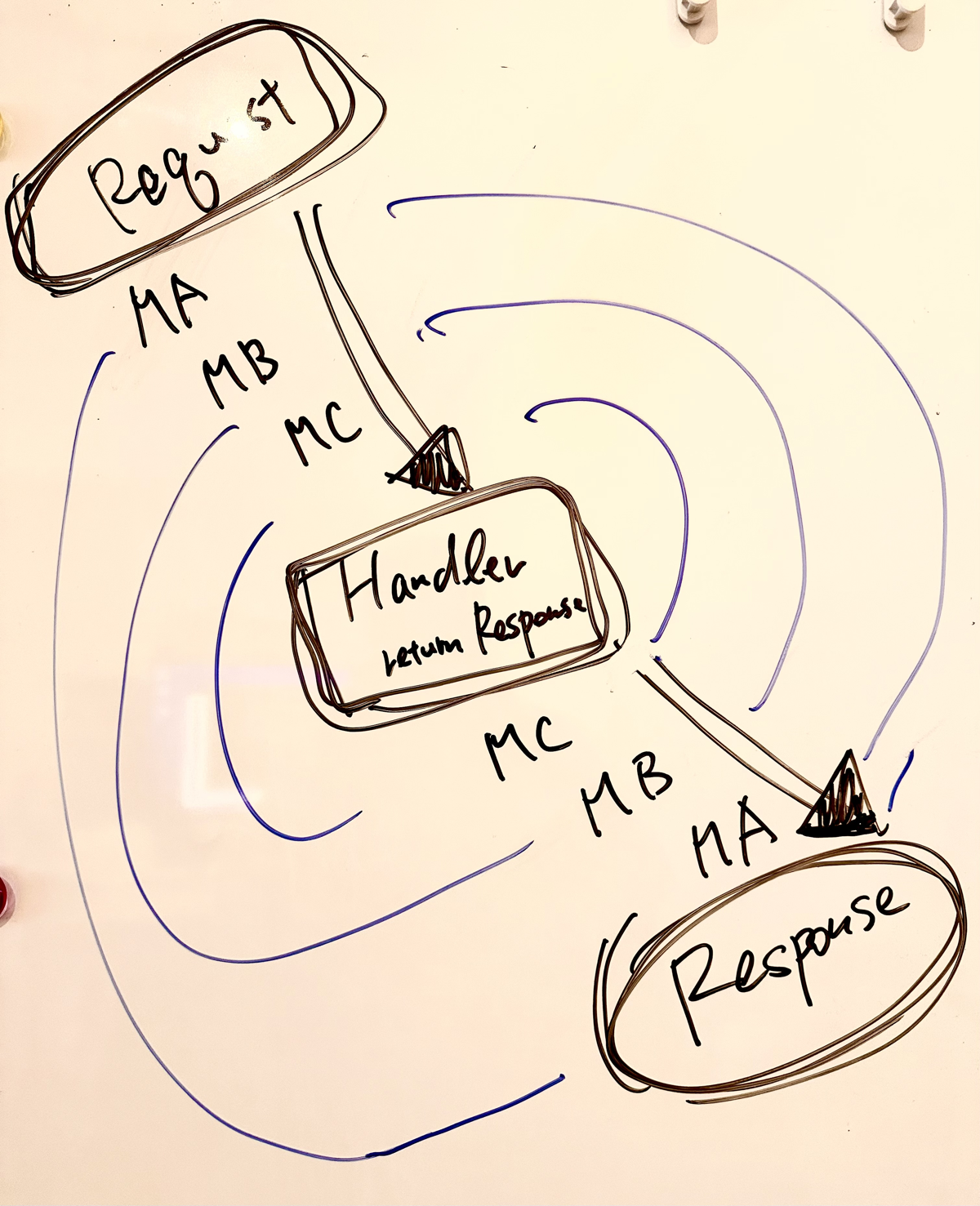
- Honoのアプリを構成するのはミドルウェアとハンドラだけ
3つのミドルウェア
- ビルトインミドルウェア、3rdパーティミドルウェア、カスタムミドルウェアがある
ミドルウェアとヘルパーの例
- Basic Authentication
- Bearer Authentication
- Cache
- Compress
- Cookie
- CORS
- ETag
- html
- JSX
- JWT Authentication
- Logger
- Pretty JSON
- Secure Headers
- GraphQL Server
- Firebase Authentication
- Sentry
- Others!
カスタムミドルウェア
X-Response-Timeヘッダを付与するミドルウェア
app.use('*', async (c, next) => {
  const start = Date.now()
  await next()
  const end = Date.now()
  c.res.headers.set('X-Response-Time', `${end - start}`)
})
JSX
- 組み込みのJSXが使える
import type { PropsWithChildren } from 'hono/jsx'

const app = new Hono()

const Layout = (props: PropsWithChildren) => {
  return (
    <html>
      <body>{props.children}</body>
    </html>
  )
}

const Top = (props: PropsWithChildren<{ messages: string[] }>) => {
  return (
    <Layout>
      <h1>Hello Hono!</h1>
      <ul>
        {props.messages.map((message) => {
          return <li>{message}!!</li>
        })}
      </ul>
    </Layout>
  )
}

app.get('/', (c) => {
  const messages = ['Good Morning', 'Good Evening', 'Good Night']
  return c.html(<Top messages={messages} />)
})
3.8 楽しいDX
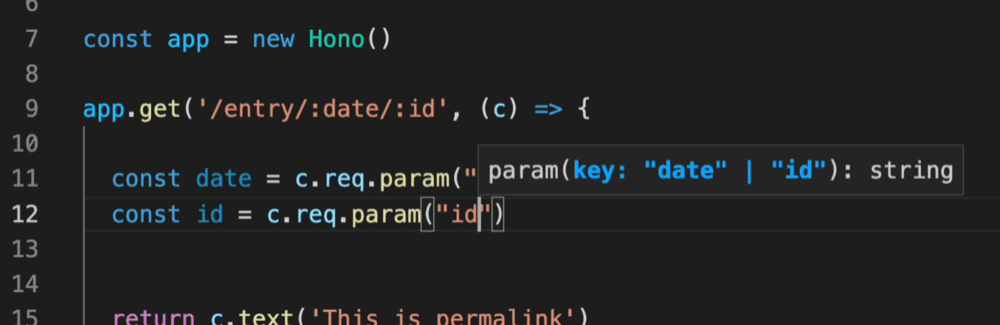
TypeScript
- HonoではアプリケーションをTypeScriptで書くことを推奨している
- Cloudflare Workers、Deno、BunはTSからJSへのトランスパイルを意識する必要がない
RPC
- サーバー側の型を共有し、クライアントでも利用することでType-Safeにする
- tRPCよりカジュアルに使える
- Zod、Zod Validator、
hcを使ったスタックがある
APIを書く
import { Hono } from 'hono'

const app = new Hono()

app.get('/hello', (c) => {
  return c.json({
    message: `Hello!`,
  })
})
Zodでバリデーションをする
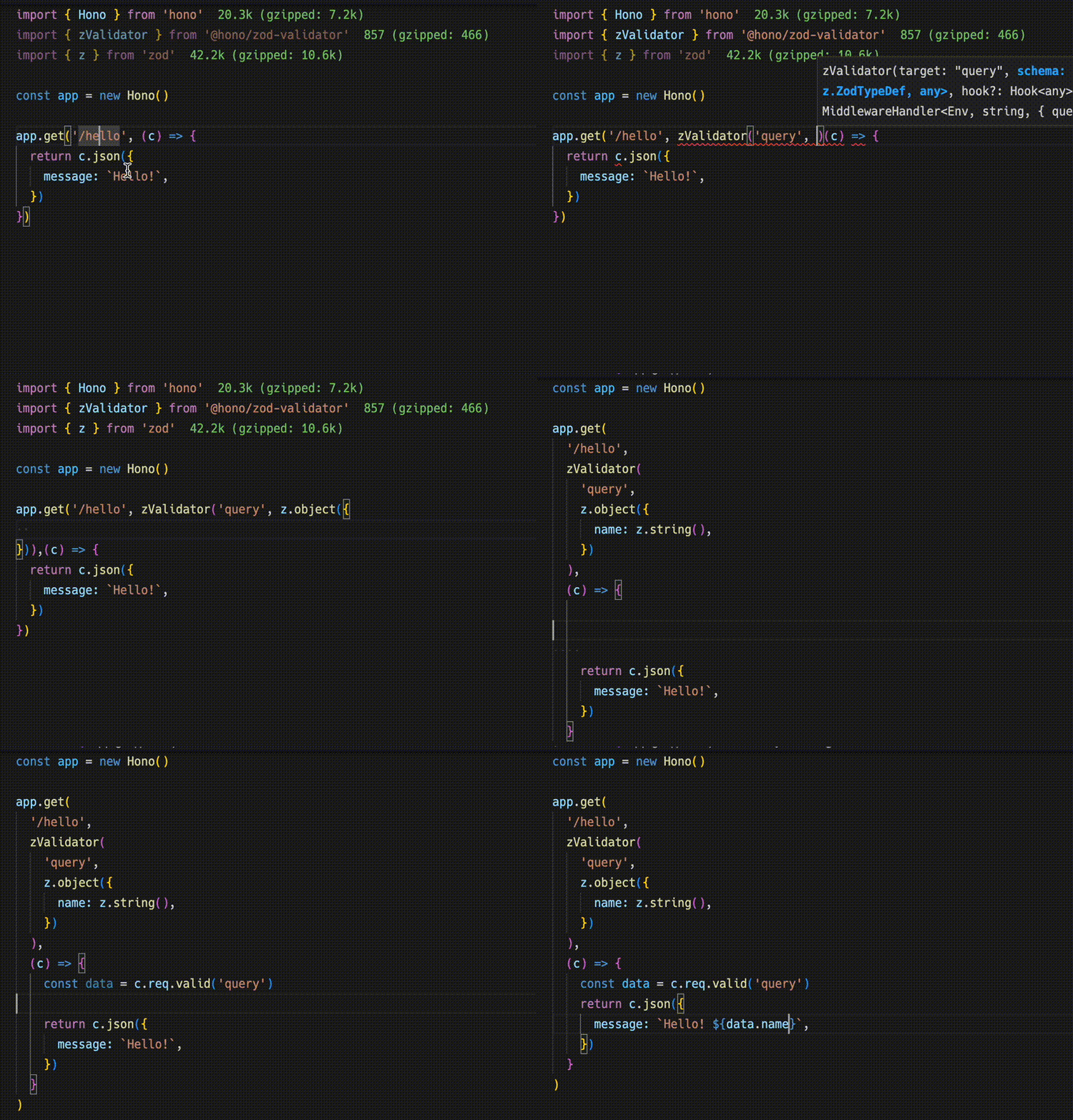
import { zValidator } from '@hono/zod-validator'
import { z } from 'zod'

app.get(
  '/hello',
  zValidator(
    'query',
    z.object({
      name: z.string(),
    })
  ),
  (c) => {
    const { name } = c.req.valid('query')
    return c.json({
      message: `Hello! ${name}`,
    })
  }
)
型を共有する
- 返り値の型をとる
const route = app.get(
  '/hello',
  zValidator(
    'query',
    z.object({
      name: z.string(),
    })
  ),
  (c) => {
    const { name } = c.req.valid('query')
    return c.json({
      message: `Hello! ${name}`,
    })
  }
)

export type AppType = typeof route
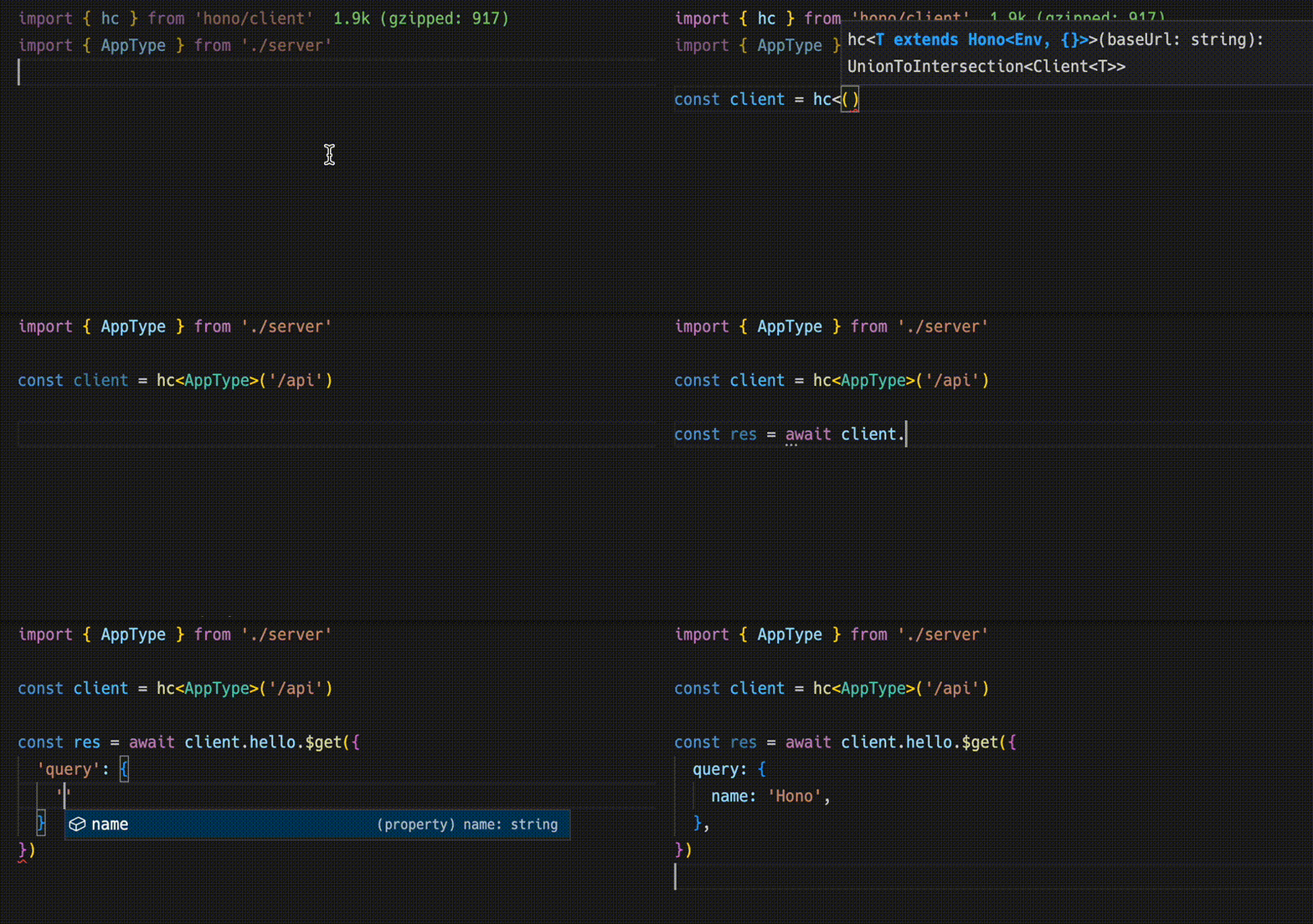
クライアントの実装
hc()でクライアントの作成- サーバーからの型をジェネリクスで渡す
- URLのパスとリクエストのパラメータの補完が効く
import { AppType } from './server'
import { hc } from 'hono/client'

const client = hc<AppType>('/api')
const res = await client.hello.$get({
  query: {
    name: 'Hono',
  },
})
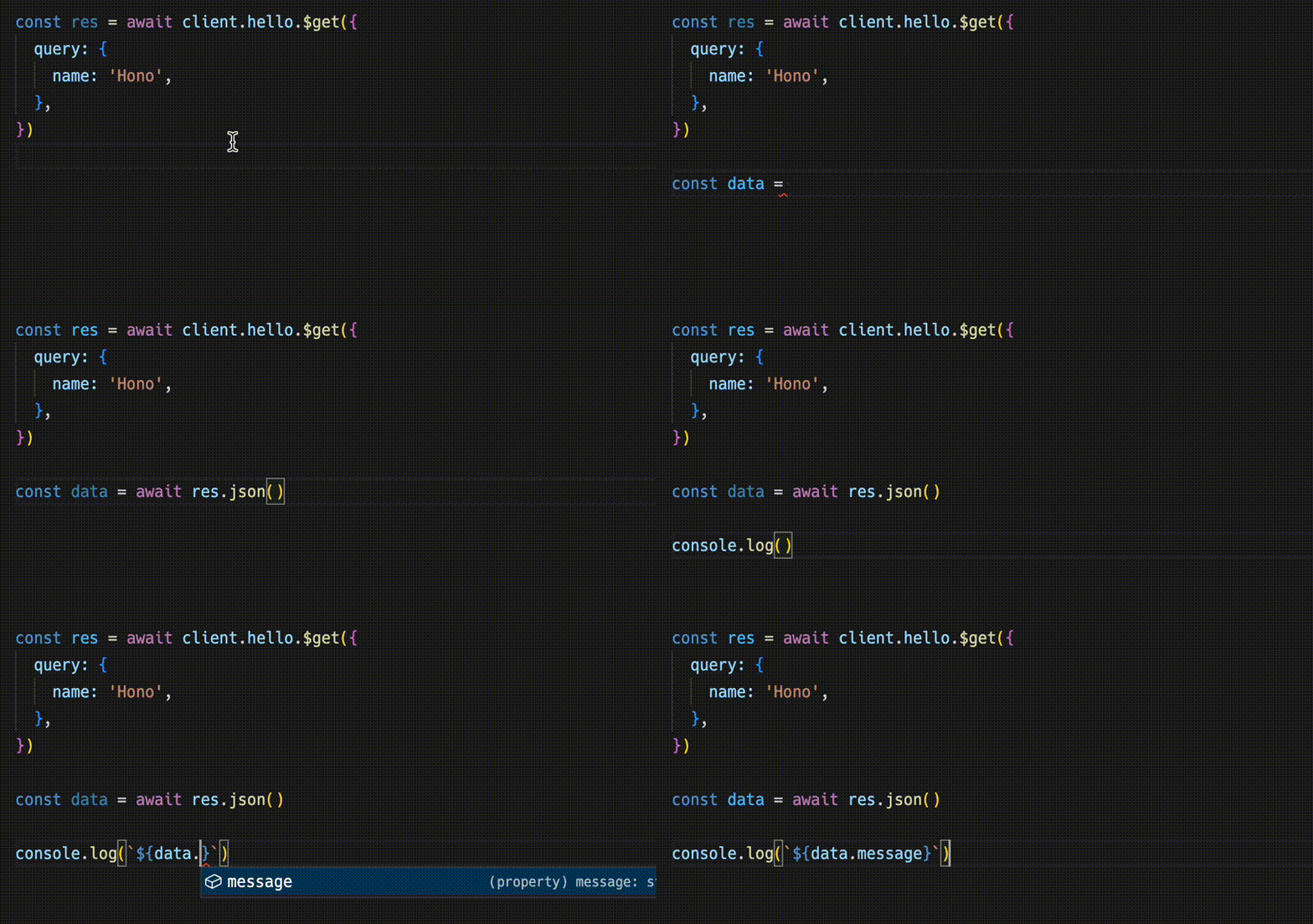
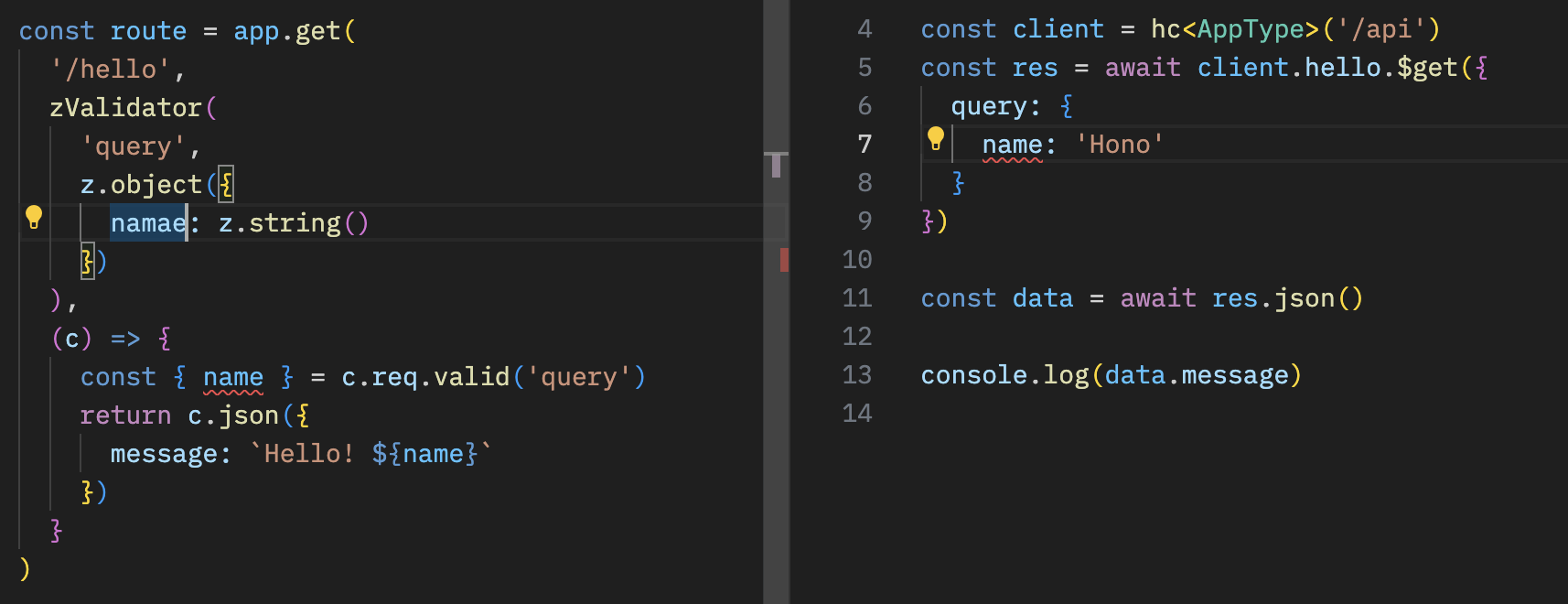
- レスポンスは
Responseオブジェクトなのでそのまま使える - ただし、
json()で取り出したオブジェクトには型がつく
const data = await res.json()
console.log(`${data.message}`)
- APIの型を共有することで、サーバーサイドの変化をクライアントで気づくことになる
テスト
- テストが簡単に書ける
describe('Example', () => {
  test('GET /posts', async () => {
    const res = await app.request('/posts')
    expect(res.status).toBe(200)
    expect(await res.text()).toBe('Many posts')
  })
})
- Testing Helperで
hcが使える
import { testClient } from 'hono/testing'

it('test', async () => {
  const app = new Hono().get('/search', (c) =>
    c.json({ hello: 'world' })
  )
  const res = await testClient(app).search.$get()

  expect(await res.json()).toEqual({ hello: 'world' })
})
3.10 Cloudflare + Hono を使ったアプリ例
r2-image-worker

4. 基本編
4.1 初めてのCloudflare Workers
C3を使う
- Create Cloudflare CLI
npm create cloudflare@latest

Or

yarn create cloudflare

Or

pnpm create cloudflare@latest

Or

bun create cloudflare
"Hello World" Worker
package.json
{
  "name": "01-hello-world",
  "version": "0.0.0",
  "private": true,
  "scripts": {
    "deploy": "wrangler deploy",
    "dev": "wrangler dev",
    "cf-typegen": "wrangler types"
  }
}
src/index.ts
export default {
  async fetch(request, env, ctx): Promise<Response> {
    return new Response('Hello World!')
  },
} satisfies ExportedHandler<Env>
fetchの引数
request-Requestオブジェクトenv- Bindingsの名前と値のレコードctx-ExecutionContext、つまりwaitUntil()とpassThroughOnException()
Workersアプリの流れ
- Requestを受け取る
- ロジック
- Responseを作る
- Responseを返す
waitUntil()
export default {
  async fetch(request, env, ctx): Promise<Response> {
    const log = async () => console.log('Foo')
    ctx.waitUntil(log())
    return new Response('Hello World!')
  },
} satisfies ExportedHandler<Env>
4.2 初めてのHono
create hono
npm create hono@latest

Or

yarn create hono

Or

pnpm create hono@latest

Or

bun create hono
レスポンスを返す
app.get('/', (c) => {
  return c.text('Hello!')
})

app.get('/json', (c) => {
  return c.json({
    message: 'Hello!',
  })
})

app.get('/html', (c) => {
  return c.json({
    message: '<h1>Hello!</h1>',
  })
})

app.get('/stream', (c) => {
  return c.streamText(async (stream) => {
    stream.sleep(1000)
    stream.writeln('Hello!')
  })
})
Contextを通してレスポンスを作る
app.get('/welcome', (c) => {
  // Set headers
  c.header('X-Message', 'Hello!')
  c.header('Content-Type', 'text/plain')

  // Set HTTP status code
  c.status(201)

  // Return the response body
  return c.body('Thank you for coming')
})
以下と同じ
new Response('Thank you for coming', {
  status: 201,
  headers: {
    'X-Message': 'Hello',
    'Content-Type': 'text/plain',
  },
})
その他
c.notFound()c.redirect()
ルーティング
// HTTP Methods
app.get('/', (c) => c.text('GET /'))
app.post('/', (c) => c.text('POST /'))
app.put('/', (c) => c.text('PUT /'))
app.delete('/', (c) => c.text('DELETE /'))

// Wildcard
app.get('/wild/*/card', (c) => {
  return c.text('GET /wild/*/card')
})

// Any HTTP methods
app.all('/hello', (c) => c.text('Any Method /hello'))

// Custom HTTP method
app.on('PURGE', '/cache', (c) => c.text('PURGE Method /cache'))

// Multiple Method
app.on(['PUT', 'DELETE'], '/post', (c) => c.text('PUT or DELETE /post'))

// Path parameters
app.get('/user/:name', (c) => {
  const name = c.req.param('name')
  ...
})

// Optional parameters
// Will match `/api/animal` and `/api/animal/:type`
app.get('/api/animal/:type?', (c) => c.text('Animal!'))

// Regexp
app.get('/post/:date{[0-9]+}/:title{[a-z]+}', (c) => {
  const { date, title } = c.req.param()
  ...
})

// Including a slash
app.get('/posts/:filename{.+.png$}', (c) => {
  //...
})

// Chained routes
app
  .get('/endpoint', (c) => {
    return c.text('GET /endpoint')
  })
  .post((c) => {
    return c.text('POST /endpoint')
  })
  .delete((c) => {
    return c.text('DELETE /endpoint')
  })
ルートを分ける
const book = new Hono()

book.get('/', (c) => c.text('List Books')) // GET /book
book.get('/:id', (c) => {
  // GET /book/:id
  const id = c.req.param('id')
  return c.text('Get Book: ' + id)
})
book.post('/', (c) => c.text('Create Book')) // POST /book

const app = new Hono()
app.route('/book', book)
ホスト名でのルーティング
const app = new Hono({
  getPath: (req) => req.url.replace(/^https?:\/(.+?)$/, '$1'),
})

app.get('/www1.example.com/hello', (c) => c.text('hello www1'))
app.get('/www2.example.com/hello', (c) => c.text('hello www2'))
Context
Bindingsの取得
// Environment object for Cloudflare Workers
app.get('*', async c => {
  const counter = c.env.COUNTER
  ...
})
c.set() / c.get()
app.use('*', async (c, next) => {
  c.set('message', 'Hono is cool!!')
  await next()
})

app.get('/', (c) => {
  const message = c.get('message')
  return c.text(`The message is "${message}"`)
})
Variableをappへ渡すことで型がつく
type Variables = {
  message: string
}

const app = new Hono<{ Variables: Variables }>()
c.var
c.set()でセットした変数へアクセスできる
const result = c.var.client.oneMethod()
その他
c.executionCtxc.eventc.error
HonoRequest
param()query()queries()header()parseBody()json()text()arrayBuffer()valid()pathurlmethodraw
5. プロキシ編
レスポンスヘッダの追加
import { Hono } from 'hono'

const app = new Hono()

app.all('*', async (c) => {
  const res = await fetch(c.req.raw)
  const newResponse = new Response(res.body, res)
  newResponse.headers.set('X-Custom', 'Foo')
  return newResponse
})

export default app
CORS
app.use('/api/*', cors())
app.use(
  '/api2/*',
  cors({
    origin: 'http://example.com',
    allowHeaders: ['X-Custom-Header', 'Upgrade-Insecure-Requests'],
    allowMethods: ['POST', 'GET', 'OPTIONS'],
    exposeHeaders: ['Content-Length', 'X-Kuma-Revision'],
    maxAge: 600,
    credentials: true,
  })
)
Basic認証
app.use(
  '/auth/*',
  basicAuth({
    username: 'yourname',
    password: 'yoursecret',
  })
)
CloudflareのBindingsの変数を使う場合
app.use('/auth/*', async (c, next) => {
  const auth = basicAuth({
    username: c.env.USERNAME,
    password: c.env.PASSWORD,
  })
  return auth(c, next)
})
認証は以下のミドルウェアがある
- Basic認証
- Bearer認証
- JWT認証
リダイレクト
app.get('/old/:id', async (c) => {
  const id = c.req.param('id')
  return c.redirect(`/new/${id}`)
})
オリジンの振り分け
const imageHost = 'http://imagehost'
const fontHost = 'http://fonthost'

app.get('/assets/:type{(?:images|fonts)}/:filename', async (c) => {
  const { type, filename } = c.req.param()
  const hostName = type === 'images' ? imageHost : fontHost
  const url = new URL(`/${filename}`, hostName)
  return fetch(url)
})
キャッシュ
app.get(
  '/assets/*',
  cache({
    cacheName: 'my-app',
  })
)
デバイス別の挙動変更
app.get('/pages/*', async (c) => {
  let isMobile = false
  const userAgent = c.req.header('User-Agent') || ''

  if (userAgent.match(/(iPhone|iPod|Android|Mobile)/)) {
    isMobile = true
  }

  const cache = caches.default

  const device = isMobile ? 'Mobile' : 'Desktop'
  const cacheKey = c.req.url + '-' + device

  let response = await cache.match(cacheKey)

  if (!response) {
    response = await fetch(c.req.raw)
    response = new Response(response.body, response)
    response.headers.append('Cache-Control', 's-maxage=3600')
    c.executionCtx.waitUntil(cache.put(cacheKey, response.clone()))
  }

  return response
})
HTMLタグの置換
HTMLRewriterを使う
app.get('/pages/*', async (c) => {
  const OLD_URL = 'oldhost'
  const NEW_URL = 'newhost'

  class AttributeRewriter {
    constructor(attributeName) {
      this.attributeName = attributeName
    }
    element(element) {
      const attribute = element.getAttribute(this.attributeName)
      if (attribute) {
        element.setAttribute(
          this.attributeName,
          attribute.replace(OLD_URL, NEW_URL)
        )
      }
    }
  }

  const rewriter = new HTMLRewriter().on(
    'a',
    new AttributeRewriter('href')
  )

  const res = await fetch(c.req.raw)
  const contentType = res.headers.get('Content-Type')

  if (contentType.startsWith('text/html')) {
    return rewriter.transform(res)
  } else {
    return res
  }
})
その他
- ホットリンク禁止
- 103 Early Hints
- 動的コンテンツのキャッシュ
- Cloudflare Workersプロキシパターン
6. Web API編
以下基本をやる
- JSONを返す
- 変数を扱う
- D1を使ってみよう
- ロジック
- バリデーション
6.1 Blog APIをつくってみよう
D1の設定
npx wrangler d1 create blog
npx wrangler d1 execute blog --local --file ./blog.sql
npx wrangler d1 execute blog --local --command "INSERT INTO posts(id,title,content) VALUES('1','Hello','Nice day!')"
npx wrangler d1 execute blog --local --command "SELECT * FROM posts"
wrangler.jsonc
{
  "name": "05-web-api",
  "main": "src/index.ts",
  "compatibility_date": "2025-04-16",
  "d1_databases": [
    {
      "binding": "DB",
      "database_name": "blog",
      "database_id": "xxxxxxxxxxxxxxxxxxxxxxx"
    }
  ]
}
CREATE TABLE posts (
  id TEXT PRIMARY KEY,
  created_at TEXT DEFAULT (datetime('now')),
  title TEXT,
  content TEXT
);
npm i zod @hono/zod-validator
共通で使う型
import { z } from 'zod'

export const schema = z.object({
  title: z.string().min(1),
  content: z.string().min(1),
})

type Post = z.infer<typeof schema> & {
  created_at: string
  id: string
}
GET /postsの実装
const { results } = await c.env.DB.prepare(
  'SELECT * FROM posts ORDER BY created_at DESC;'
).all<Post>()
- Bindingsへは
c.env.DBでアクセス allへPost型をジェネリクスで渡す
POST /postsの実装
Zod Validatorを使う
import { zValidator } from '@hono/zod-validator'
// ...
app.post('/posts', zValidator('form', schema), async (c) => {
  const { title, content } = c.req.valid('form')
  // ...
})
UUIDの生成
const id = crypto.randomUUID()
Insertの実行
const { success } = await c.env.DB.prepare(
  'INSERT INTO posts(id, title, content) values (?, ?, ?)'
)
  .bind(id, title, content)
  .run()
デプロイ
npm run deploy
実際はWranglerを実行している
wrangler deploy --minify src/index.ts
7. フルスタック編
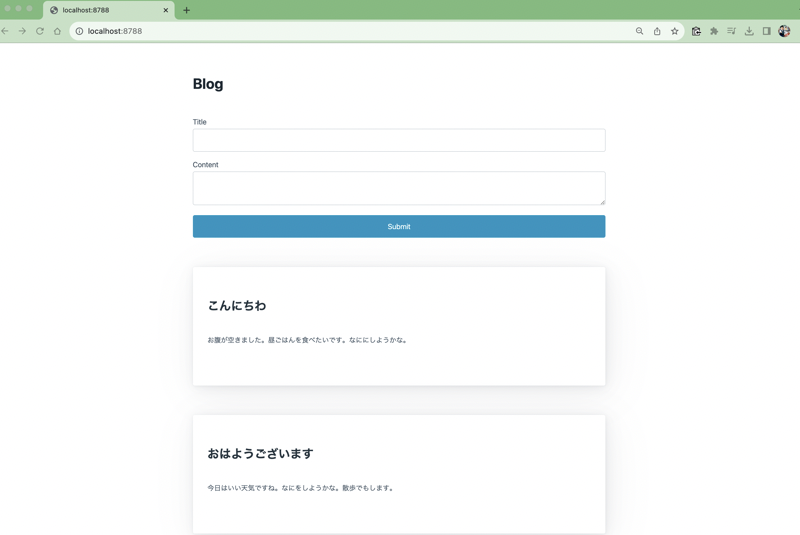
7.1 BlogのUIもつくってみよう
- 拡張子を
.tsxにしてJSXを使おう - シンプルなSSRでの描画をする
完成形
Rendererを定義する
import { jsxRenderer } from 'hono/jsx-renderer'

export const renderer = jsxRenderer(({ children }) => {
  return (
    <html lang='en'>
      <head>
        <meta
          name='viewport'
          content='width=device-width, initial-scale=1'
        />
        <link
          rel='stylesheet'
          href='https://cdn.jsdelivr.net/npm/@picocss/pico@1/css/pico.min.css'
        />
      </head>
      <body>
        <main class='container'>
          <h1>
            <a href='/'>Blog!</a>
          </h1>
          {children}
          <div style='margin-top:2rem'>
            <small>© 2025 your name</small>
          </div>
        </main>
      </body>
    </html>
  )
})
Rendererを使う
import { Hono } from 'hono'
import { renderer } from './renderer'

const app = new Hono<{ Bindings: CloudflareBindings }>()

app.use(renderer)
一覧をHTMLで表示する
app.get('/', async (c) => {
  const { results: posts } = await c.env.DB.prepare(
    'SELECT * FROM posts ORDER BY created_at DESC;'
  ).all<Post>()
  return c.render(
    <div>
      <title>Blog</title>
      <form action='/' method='post'>
        <div>
          <label>Title</label>
          <input type='text' name='title' />
        </div>
        <div>
          <label>Content</label>
          <textarea name='content'></textarea>
        </div>
        <button type='submit'>Submit</button>
      </form>
      {posts.map((post) => {
        return (
          <article>
            <h2>{post.title}</h2>
            <p>{post.content}</p>
          </article>
        )
      })}
    </div>
  )
})
記事を作る
app.post(
  '/',
  zValidator('form', schema, (result, c) => {
    if (!result.success) {
      console.error(result.error.message)
      return c.redirect('/')
    }
  }),
  async (c) => {
    const id = crypto.randomUUID()
    const { title, content } = c.req.valid('form')

    await c.env.DB.prepare(
      'INSERT INTO posts(id, title, content) values (?, ?, ?)'
    )
      .bind(id, title, content)
      .run()

    return c.redirect('/')
  }
)
8. AI編
8.1 リモートMCPサーバーをつくってみよう
- ブログの仕組みをそのままリモートMCPにする
@hono/mcpと@modelcontextprotocol/sdkを使った認証レス、ステートレスの超簡易なもの- CloudflareのAgents SDKも使える
- https://github.com/yusukebe/cloudflare-workshop-examples/tree/main/projects/07-mcp
@hono/mcpを使う
import { Hono } from 'hono'
import { McpServer } from '@modelcontextprotocol/sdk/server/mcp.js'
import { StreamableHTTPTransport } from '@hono/mcp'

const app = new Hono<{ Bindings: CloudflareBindings }>()

app.all('/mcp', async (c) => {
  const transport = new StreamableHTTPTransport()

  const mcpServer = new McpServer({
    name: 'my-blog-mcp-server',
    version: '1.0.0',
  })

  await mcpServer.connect(transport)
  return transport.handleRequest(c)
})

export default app
ツールの定義
app.all('/mcp', async (c) => {
  const transport = new StreamableHTTPTransport()

  const mcpServer = new McpServer({
    name: 'my-blog-mcp-server',
    version: '1.0.0',
  })

  mcpServer.tool('get_posts', async () => {
    const { results: posts } = await c.env.DB.prepare(
      'SELECT * FROM posts ORDER BY created_at DESC;'
    ).all<Post>()
    return {
      content: [
        {
          type: 'text',
          text: JSON.stringify(posts),
        },
      ],
    }
  })

  mcpServer.tool(
    'create_post',
    { title: z.string(), content: z.string() },
    async ({ title, content }) => {
      const id = crypto.randomUUID()
      const { success } = await c.env.DB.prepare(
        'INSERT INTO posts(id, title, content) values (?, ?, ?)'
      )
        .bind(id, title, content)
        .run()
      return {
        content: [
          {
            type: 'text',
            text: JSON.stringify({ success }),
          },
        ],
      }
    }
  )

  await mcpServer.connect(transport)
  return transport.handleRequest(c)
})
8.2 Workers AIを使ってみよう
- 推論モデルを動かすだけなら簡単
- たくさんのモデル https://developers.cloudflare.com/workers-ai/models/
8.3 Agents
- https://agents.cloudflare.com/
- Cloudflare上でAIエージェントを作ろう
- 新しいプロダクトというよりか、Workersとその他を組み合わせたもの
そもそもCloudflareでAIをやる意味
- サーバーレス
- Durable Objectsで状態を管理できる
- Workers AI、Schedule、Workflowsなどがある
- Agents SDKがある
- 例: MCPの認証の実装は面倒だが、提供してくれている
- MCPサーバーへの取り組み
8.4 Sandbox SDK
- https://sandbox.cloudflare.com/
- 隔離されたコンテナの環境でアプリを実行する
- AIがコードを実行するのに使える
- あとはCI/CDなど
import { getSandbox } from '@cloudflare/sandbox'

export default {
  async fetch(request: Request, env: Env): Promise<Response> {
    const sandbox = getSandbox(env.Sandbox, 'user-123')

    // Execute a command and get the result
    const result = await sandbox.exec('python --version')

    return Response.json({
      output: result.stdout,
      exitCode: result.exitCode,
      success: result.success,
    })
  },
}
8.5 x402
- https://blog.cloudflare.com/x402/
- https://developers.cloudflare.com/agents/x402/
- Coinbaseと協力し「x402」を設立
- 402 Payment Requiredを使ってHTTP経由で支払いする
- Cloudflareネットワークでできるようになるかもしれない
- 現在もWorkersで実装できる
デモ
- MCPサーバーがx402を実装し支払いを要求
- クライアントも実装してある
- 0.01ドルだけ使える
- ツール呼び出し使う
- 一度使うと無一文になるので使えない
- https://playground.x402.cloudflare.com/
9. Honoをより深く使う
9.1 他のランタイムで動かしてみよう
- aws-lambda
- bun
- cloudflare-pages
- cloudflare-workers
- deno
- fastly
- lagon
- lambda-edge
- netlify
- nextjs
- nodejs
- vercel
9.2 大きなアプリケーションの構成
app.route()で繋いでいく
9.3 アダプトとマウント
app.mount()
- アダプターの他にマウントという概念
fetchAPIならどんなアプリもマウントできる
// Create itty-router application
const ittyRouter = IttyRouter()

// Handle `GET /itty-router/hello`
ittyRouter.get(
  '/hello',
  () => new Response('Hello from itty-router!')
)

// Hono application
const app = new Hono()

// Hono application
app.mount('/itty-router', ittyRouter.handle)
Honoはランタイムにアダプトし、フレームワークをマウントする

フレームワークAは各ランタイムへのアダプターを作りがち

フレームワークAを各種ランタイムに対応させたければ、Hono上で動けばよい

マウントすることでHonoのミドルウェアが使える
app.use('/another-app/admin/*', basicAuth({ username, password }))
10. その他
- Containers
- Bindingsのテストについて
- Vite plugins
- HonoXについて